
We have probably seen your problem before. Our smallest client had eight employees. Our largest secures the nuclear power plant of the United Arab Emirates. Whatever shape yours is, tell us about it and we will tell you how we would fix it.
Securing Windows endpoints isn't optional - it's essential. But for most users and even IT professionals, navigating the hundreds of security settings scattered across Group Policy, Windows Defender, registry keys, and PowerShell commands is overwhelming. That's why we built Atlant Security Hardening - a powerful, open-source Windows 11 security hardening tool that brings enterprise-grade protection to everyone.

The Problem We're Solving
Windows 11 ships with robust security features, but most of them are disabled by default. Microsoft prioritizes compatibility and user experience over security, leaving systems vulnerable to ransomware, credential theft, phishing attacks, and malware. Hardening a Windows system properly requires:
- Deep knowledge of Windows internals
- Hours of manual configuration
- Understanding of which settings might break your workflow
- A reliable way to undo changes if something goes wrong
Atlant Security Hardening solves all of these problems in a single, elegant application.
REMEMBER TO ALWAYS BACKUP YOUR SYSTEM BEFORE CHANGING SECURITY SETTINGS!
What Makes Atlant Security Hardening Different
599 Security Settings in One Place
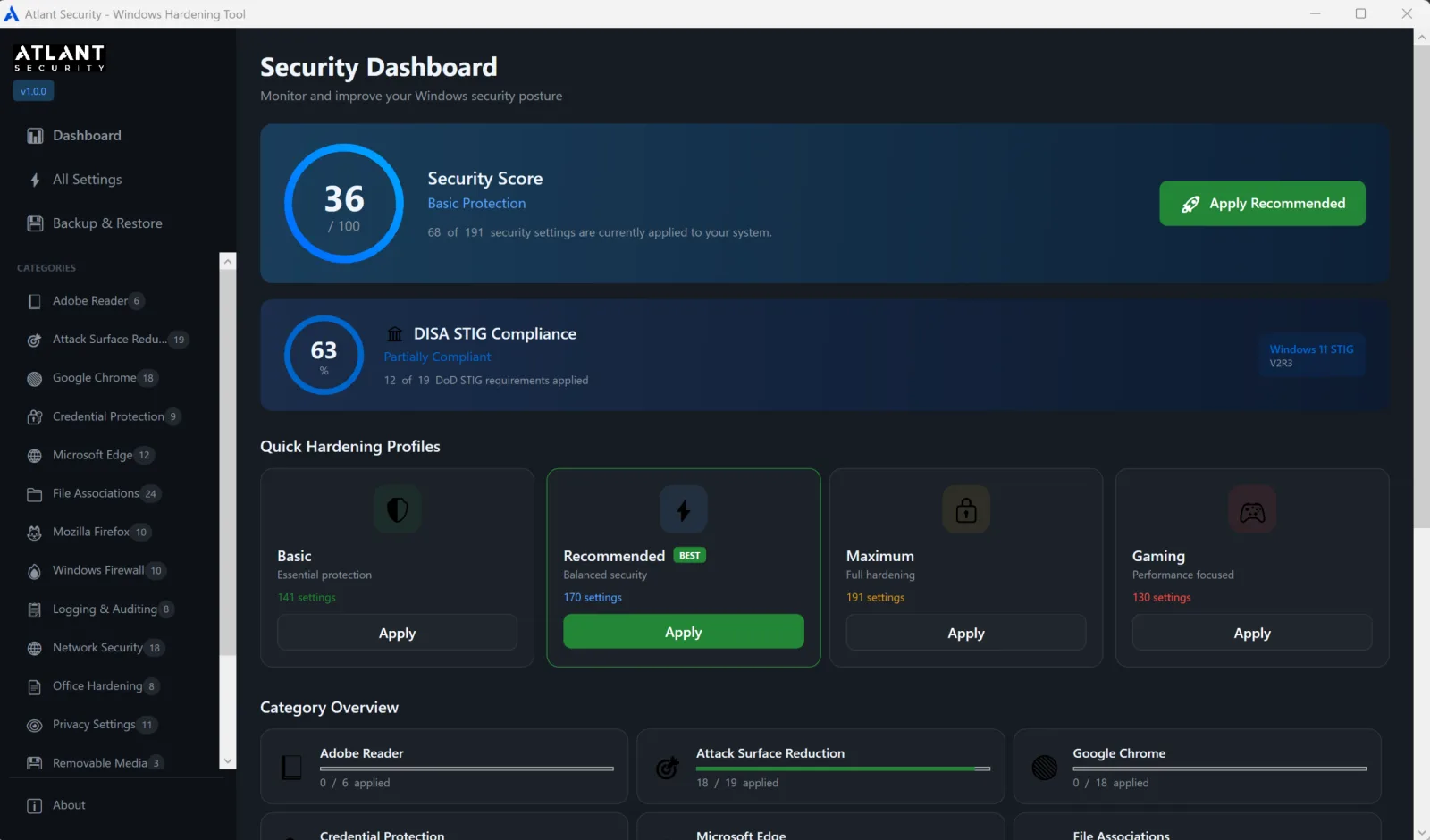
We've consolidated 599 security hardening settings into a single application, organized into intuitive categories:
- Windows Defender - Maximize your built-in antivirus protection
- Attack Surface Reduction (ASR) - Block common attack vectors used by malware
- Credential Protection - Prevent password and token theft
- Network Security - Harden SMB, disable legacy protocols, enforce signing
- Browser Hardening - Secure Edge and Chrome with enterprise policies
- Privacy Controls - Limit telemetry and data collection
- File Associations - Neutralize dangerous file types
- DISA STIG Compliance - Meet federal security standards
Smart Risk Assessment
Not all security settings are created equal. Some provide protection with zero impact on your daily work, while others might break legitimate workflows. We've carefully evaluated every setting from a user experience perspective and assigned risk levels:
- Low Risk (~95 settings) - Safe for everyone. No noticeable impact on daily use.
- Medium Risk (~223 settings) - May occasionally require troubleshooting.
- High Risk (~261 settings) - Will noticeably change system behavior. For advanced users only.
This risk assessment powers our profile system, so you can choose your security level with confidence.
One-Click Security Profiles
Choose your protection level with a single click:
| Profile | Settings | Best For |
|---|---|---|
| Basic | 95 | Everyone - low risk, high security improvement |
| Recommended | 325 | Most users - stops real malware and exploitation, gaming and performance safe |
| Maximum | 599 | High-security and audited environments that want full STIG compliance |
What changed in v2.0: the Recommended profile was rebuilt around a simple principle, stop how malware and attackers actually get in and run, and skip the friction that does not. It does not disable your password manager, InPrivate, or history, and it does not turn on Controlled Folder Access, FIPS, or a BitLocker pre-boot PIN. It is already gaming and performance safe. Maximum still applies the full DISA STIG lockdowns when you want them. AtlantHarden v2.0 now ships 599 settings and 354 DISA STIG controls across Windows 11, Edge, Chrome, Firefox, and Office 365.
Real-Time Status Verification
Unlike simple script-based hardening tools, Atlant Security Hardening actually verifies the status of every setting on startup. We query:
- Windows Registry for policy settings
- Windows Defender for ASR rules and protection status
- Windows Firewall for blocking rules
- Audit policies for logging configuration
- File associations for dangerous extensions
This means the dashboard always shows you the actual state of your system, not just what you asked it to apply.
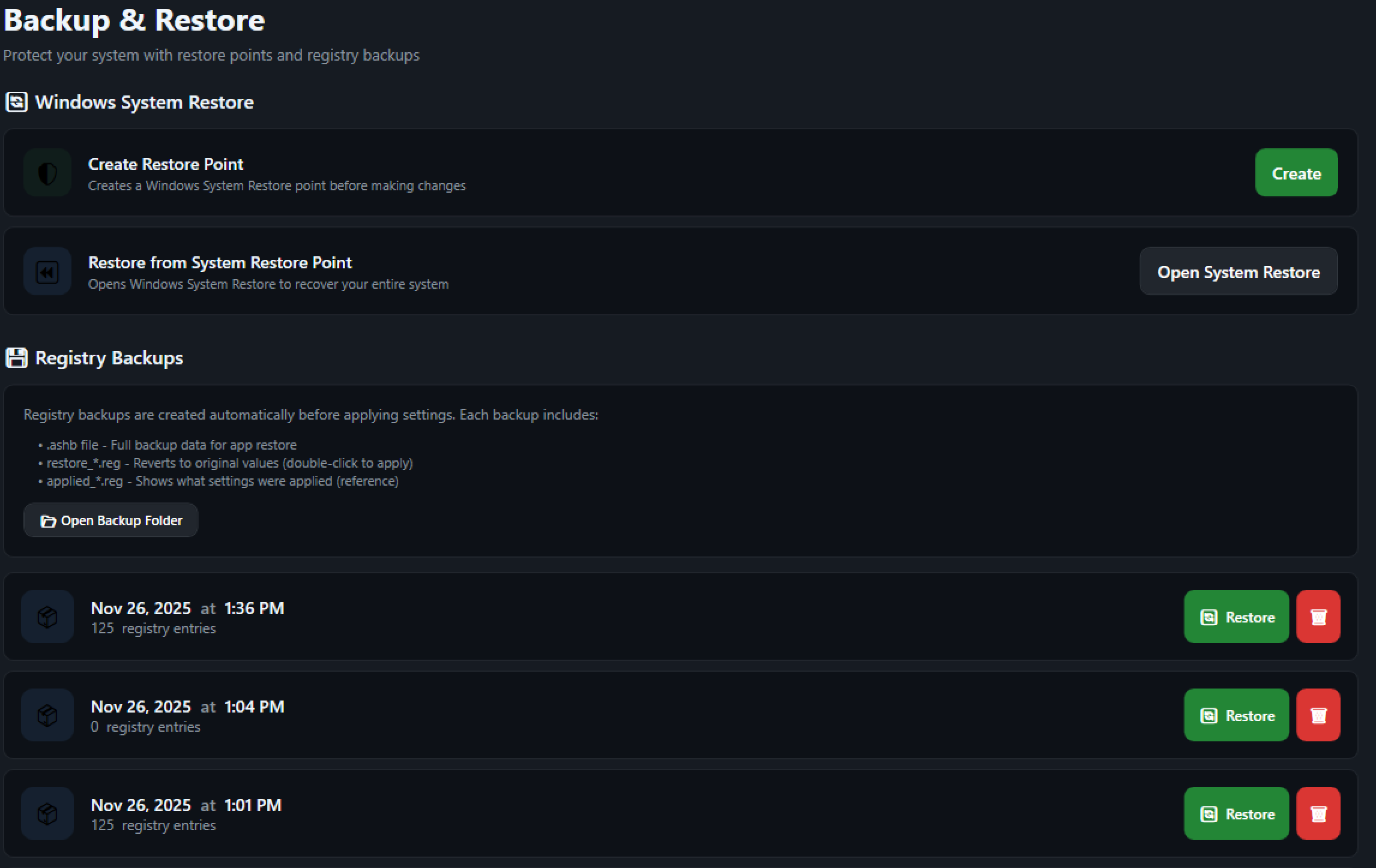
Enterprise Backup & Restore
Making security changes to production systems is risky. That's why we built a comprehensive backup system:
- Automatic backups before any changes are applied
- Triple-format backups: Application format (.ashb), restore registry files, and applied settings registry files
- System Restore Point integration - Create Windows restore points with one click
- Granular restore - Restore individual settings or entire backup sets
We prominently warn users to create System Restore Points before making changes, because we believe in defense in depth - even for our own application.
Deep Dive: Key Security Features
Attack Surface Reduction (ASR) Rules
ASR rules are one of Windows Defender's most powerful - and most underutilized - features. They block common attack techniques at the operating system level:
- Block Office applications from creating child processes
- Block Office apps from injecting code into other processes
- Block Win32 API calls from Office macros
- Block executable content from email clients
- Block JavaScript and VBScript from launching downloaded executables
- Block credential stealing from LSASS
- Advanced ransomware protection
Atlant Security Hardening makes enabling these rules simple and shows you exactly which are active on your system.
File Association Neutralization
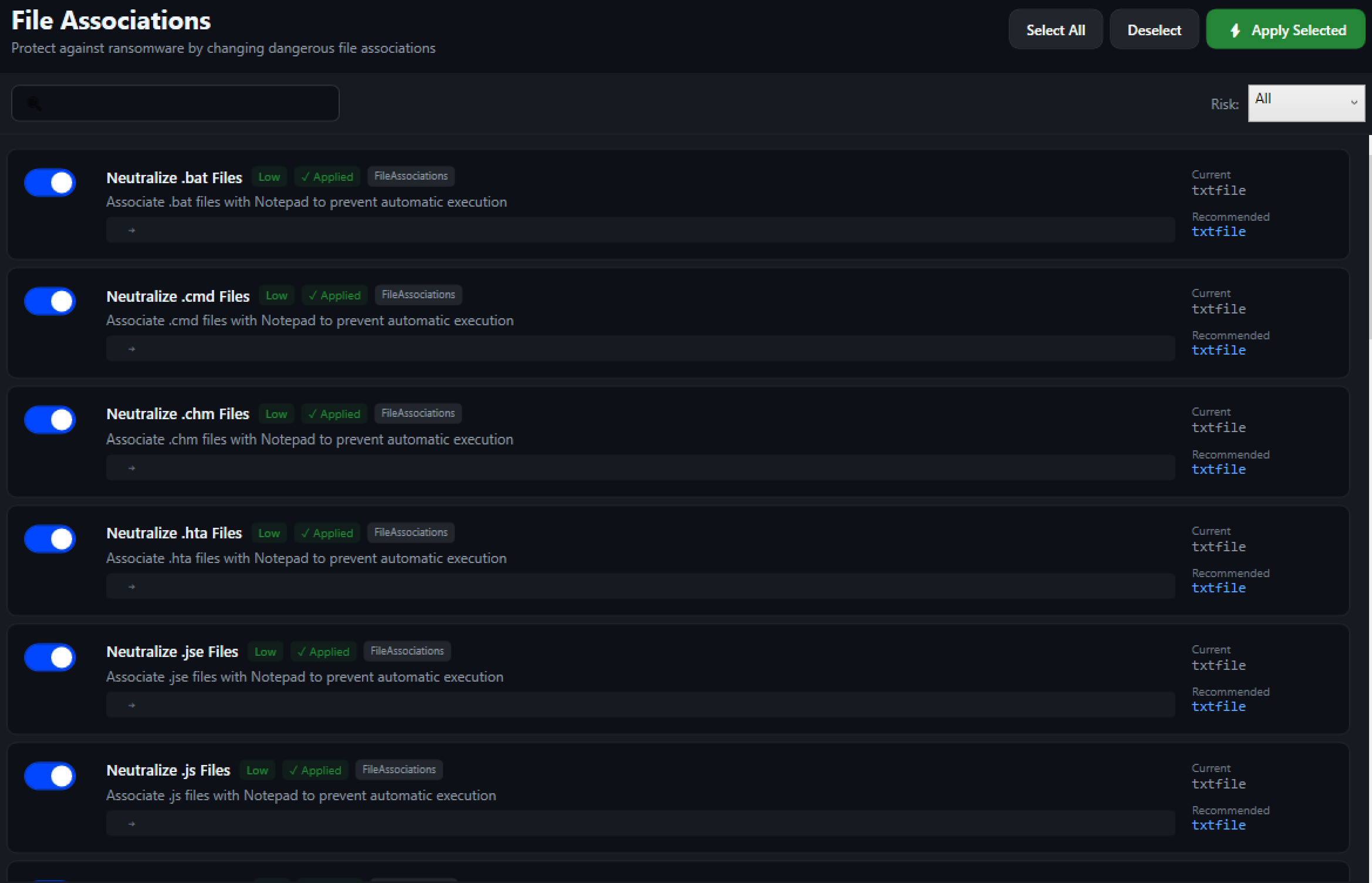
One of the oldest tricks in the malware playbook is disguising malicious files with innocent-looking icons. A file named invoice.pdf.vbs might look like a PDF but actually runs a VBScript when opened.
Our file association hardening changes dangerous extensions to open in Notepad instead of executing:
.bat .cmd .hta .js .vbs .ps1 .wsf .scr .reg and 15 more
This simple change can stop entire categories of attacks.
Network Protocol Hardening
Legacy network protocols are a favorite target for attackers. We help you disable:
- SMB v1 - The protocol exploited by WannaCry and NotPetya
- LLMNR and NetBIOS - Used for credential interception attacks
- WPAD - Exploited for man-in-the-middle attacks
- Weak TLS versions - SSL 2.0, SSL 3.0, TLS 1.0, TLS 1.1
And enable security features like SMB signing and LDAP signing to prevent tampering.
DISA STIG Compliance
For organizations that need to meet federal security standards, we've integrated 19 settings from the Defense Information Systems Agency (DISA) Security Technical Implementation Guides (STIGs):
- Credential caching limits
- Anonymous enumeration restrictions
- Session security requirements
- Audit policy configurations
The dashboard shows your STIG compliance percentage at a glance.
Firewall Hardening
Living-off-the-land binaries (LOLBins) are legitimate Windows tools that attackers abuse for malicious purposes. Our firewall rules block outbound network access for commonly abused tools:
certutil.exe mshta.exe regsvr32.exe rundll32.exe wmic.exe cscript.exe wscript.exe msiexec.exe powershell_ise.exe cmstp.exe
These rules stop attackers from using your own system tools against you.
The User Experience
Modern, Dark-Themed Interface
We've built Atlant Security Hardening with a clean, modern interface that security professionals will appreciate. The dark theme reduces eye strain during long sessions, and the organized category navigation makes it easy to find specific settings.
Global Search
With 599 settings, finding what you need could be tedious. Our global search lets you instantly filter settings by name, description, or tags. Looking for SMB settings? Just type "SMB" and see all related options.
Detailed Information
Every setting includes:
- Clear name and description
- Risk level indicator
- Impact warnings for high-risk settings
- Current status (Applied/Not Applied)
- Current value on your system
Progress Tracking
The dashboard shows your overall security score and breaks it down by category. Watch your score improve as you apply hardening settings, and identify which areas need attention.
Getting Started
- Download Atlant Security Hardening
- Run as Administrator (required for system changes)
- Create a System Restore Point (we'll remind you!)
- Review the dashboard to see your current security posture
- Choose a profile or select individual settings
- Apply and let the application do the work
- Verify the results in the dashboard
Open Source & Community Driven
Atlant Security Hardening is open source because security benefits everyone. We welcome contributions, bug reports, and suggestions from the community. Every setting has been researched and tested, but we're always learning and improving.
DOWNLOAD
To download the app, head to this link.
Windows security doesn't have to be complicated. Atlant Security Hardening brings together years of security research, Microsoft best practices, and federal compliance requirements into a single, easy-to-use application. Whether you're a home user who wants better protection or an IT professional hardening an enterprise fleet, we've built a tool that makes Windows security accessible to everyone.
Your system's security is only as strong as its configuration. Make every setting count.
Troubleshooting
If you decide to apply ALL the security settings at once on your work computer, many of your applications may stop working. Not only that, OUR security hardening app will stop working.
To be able to launch our app again and restore the settings that blocked it from running (Attack surface reduction - prevent apps that do not meet prevalence or age from running) - go into Settings, Privacy and Security, Windows Security, Virus and Threat Protection - > Virus and Threat protection Settings - > scroll to the very bottom and find Exclusions:
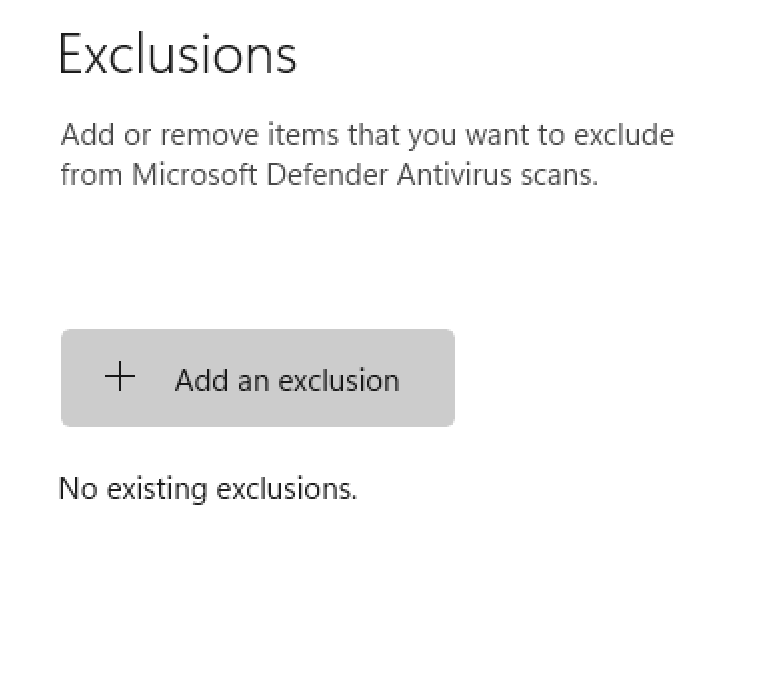
And add the folder where the app is, as an Exclusion.
See also: Strengthening Your Cyber Resilience: A Comprehensive Guide
Ready to get started? Atlant Security helps companies close security gaps and pass compliance fast, led personally by a former Microsoft security consultant with 200+ assessments across 14 countries. Book a free strategy call and get a fixed-price proposal within 24 hours.
Want to know where you actually stand?
A fixed-price IT security audit answers that in 14 days: 20 NIST 800-53 domains checked against your live environment, findings ranked by what an attacker can reach, and a remediation plan with named owners. You read the report before you pay.
See what the 14-day audit covers