
We have probably seen your problem before. Our smallest client had eight employees. Our largest secures the nuclear power plant of the United Arab Emirates. Whatever shape yours is, tell us about it and we will tell you how we would fix it.
Timestomping is one of the oldest moves in the anti-forensics playbook. An attacker drops a malicious binary, then backdates its timestamps so it looks like it has been part of the system since the day Windows was installed. To an analyst skimming a timeline sorted by creation date, the file disappears into a sea of legitimate system files from years ago. It is simple, it is built into common offensive tooling, and against a naive review it works. The reason it can be caught is that NTFS stores timestamps in more than one place, and most timestomping only touches one of them.
Two sets of timestamps, not one
Every NTFS file record carries timestamps in two different attributes. $STANDARD_INFORMATION ($SI) holds the timestamps that Windows shows you in Explorer and that most tools, including most timestomping tools, can modify through normal API calls. $FILE_NAME ($FN) holds a second set, updated by the kernel during file and directory operations and not writable through the ordinary user-facing APIs. Both carry the MACB set: Modified, Accessed, Changed, and Born.
This split is the attacker's problem. A tool that backdates a file typically rewrites the four $SI timestamps, because those are the ones the world looks at. The $FN timestamps, harder to reach, are often left showing the real creation time, the moment the file actually landed on the system. The forgery and the truth end up sitting side by side in the same record.
The tells that expose manipulation
A few specific anomalies betray timestomping, and they are reliable enough to flag automatically:
- $SI earlier than $FN. If the $STANDARD_INFORMATION creation time predates the $FILE_NAME creation time, something rewrote $SI to the past. A file cannot legitimately have been created before the filesystem recorded its name. This $SI < $FN inversion is the single strongest indicator of timestomping.
- Zeroed sub-second precision. Genuine NTFS timestamps are stored with 100-nanosecond granularity, so the sub-second digits are effectively random. Many timestomping tools only set whole seconds, leaving the sub-second portion as all zeros. A creation time that lands exactly on the second, with nothing below it, is suspicious.
- Reused MFT slots. When a file is deleted and a new one takes its MFT record number, the sequence metadata reflects the reuse. Combined with timestamp oddities, a reused slot can indicate an attacker trying to occupy a record that looks established.
- Timeline impossibilities. A file whose timestamps predate the operating system install, or that sits inconsistently against the surrounding USN journal activity, is worth a second look.
Why the $SI versus $FN check is so reliable
The strength of the $SI versus $FN comparison is that it does not depend on knowing what normal looks like for a given system. It is an internal consistency check: the record contradicts itself. Defeating it requires an attacker to forge both attribute sets coherently, which is significantly harder and beyond what most off-the-shelf timestomping does. That is why this one comparison catches so much real-world tampering.
Catching it automatically with Atlant Scalpel
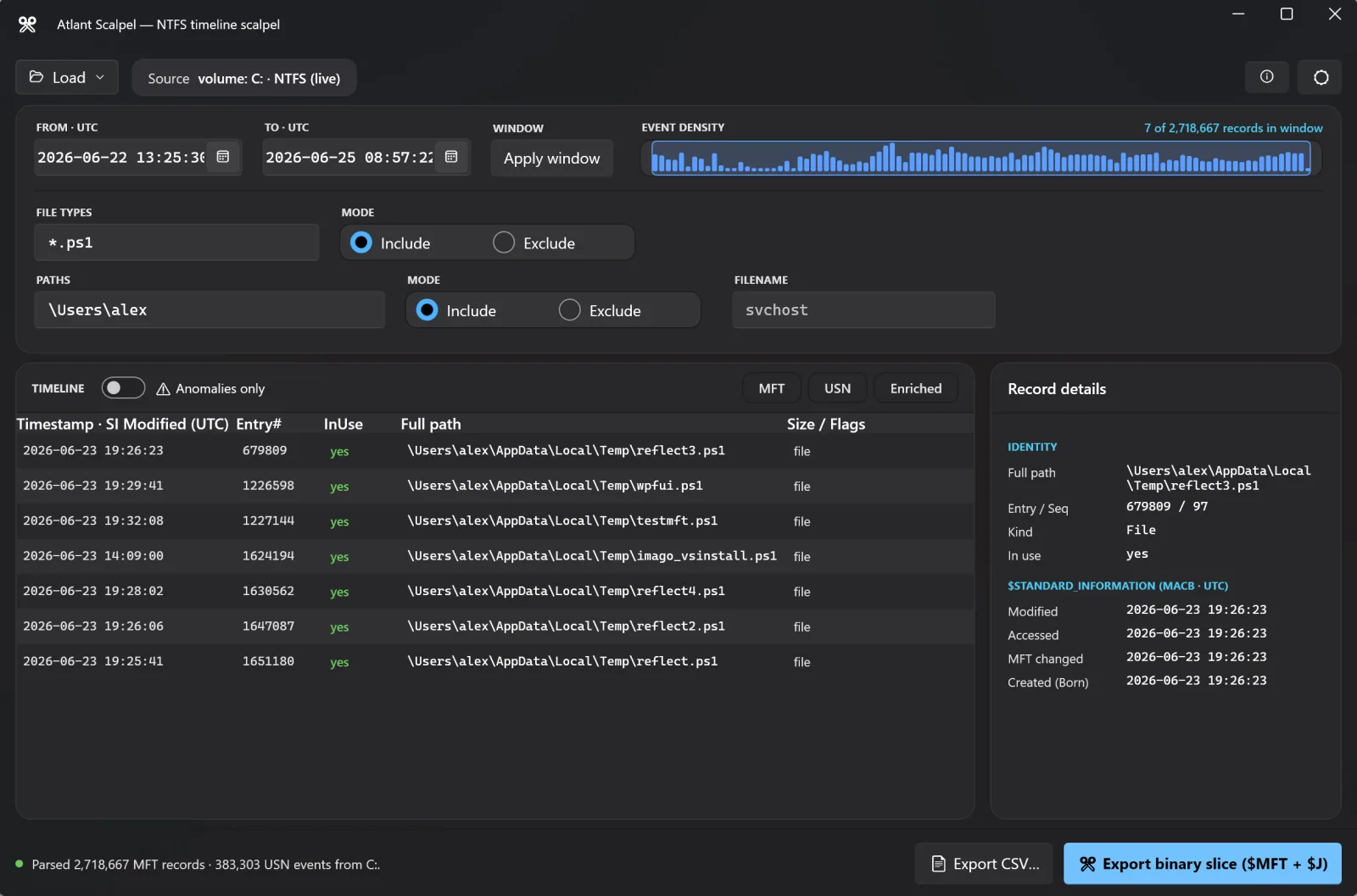
Hunting for these inversions by eye across millions of records is hopeless. Atlant Scalpel surfaces them for you as you browse. While it reconstructs the NTFS timeline from the $MFT and USN journal, it raises built-in anomaly flags for exactly these patterns: $SI earlier than $FN timestamp inversions, sub-second-zeroed timestamps, and reused MFT slots. A single click collapses the view to only the flagged records, so instead of scrolling a haystack you start from the needles. From there you can scope a UTC window, filter by extension or path, and export the suspect set in full to Timeline Explorer, plaso, or The Sleuth Kit for the rest of your analysis.
Because it loads live volumes, disk images, shadow copies, or extracted artifacts, you can run the same anomaly pass on a triage capture in the field or on a full image back in the lab. The free, single-executable tool needs no installer and elevates itself when it needs raw volume access.
The takeaway
Timestomping relies on you trusting a single set of timestamps. NTFS gives you a second set the attacker usually cannot reach, plus precision and slot-reuse artifacts that the forgery tends to ignore. Compare $SI against $FN, watch for zeroed sub-seconds, and let a tool flag the contradictions automatically. The backdated file that was supposed to vanish into old system noise is often the one record that flags itself.
Atlant Scalpel is free. Download Atlant Scalpel (one portable executable, no installer, no signup). To build the full timeline these flags live in, see our guide on the MFT and USN journal. Book a discovery call if you want our team to help.
Dealing with an incident, or worried about the next one?
Incident response led by people who have run these before: contain it, work out what actually happened, and close the route in. We also build the plan in advance so the first hour is not improvised.
See incident response