
We have probably seen your problem before. Our smallest client had eight employees. Our largest secures the nuclear power plant of the United Arab Emirates. Whatever shape yours is, tell us about it and we will tell you how we would fix it.
Ask any incident responder what they reach for first and the answer is almost always the same: a timeline. What ran, what was written, what was deleted, and in what order. On NTFS, most of that story lives in two structures, and learning to read them together is one of the highest-leverage skills in Windows forensics.
The Master File Table
The MFT is NTFS's central index: one record per file and directory, holding the name, parent, size, and a set of timestamps. Those timestamps follow the MACB model, Modified, Accessed, Changed (metadata change), and Born (creation). They come from two attributes, $STANDARD_INFORMATION and $FILE_NAME, a distinction that matters enormously for tamper detection. The MFT also retains records for deleted-but-not-yet-overwritten files, which is why it can reveal activity an attacker thought they had erased. Reading the MFT gives you a snapshot: the state of the filesystem now, plus the timestamps each file carries.
The USN change journal
Where the MFT is a snapshot, the USN journal ($UsnJrnl:$J) is a recording. NTFS appends an entry every time a file is created, written, renamed, or deleted, capturing the file, the change reason, and when it happened. That makes the journal a sequential log of filesystem activity over time, exactly the dimension a single MFT snapshot lacks. Its weakness is that it is a rolling buffer with finite size, so older events age out, and on their own its records are terse.
Why correlation beats either one alone
Read separately, each artifact has a blind spot. The MFT tells you a file's current timestamps but not the sequence of changes that produced them. The USN journal tells you the sequence of changes but identifies files by reference number, not by readable path. Correlate them and the blind spots cancel: you resolve every USN event back to a full, human-readable path via the MFT, and you enrich each MFT record with the journal's history of how it got there. The result is a single, path-resolved super-timeline, the artifact you actually want to investigate from.
Scope before you read
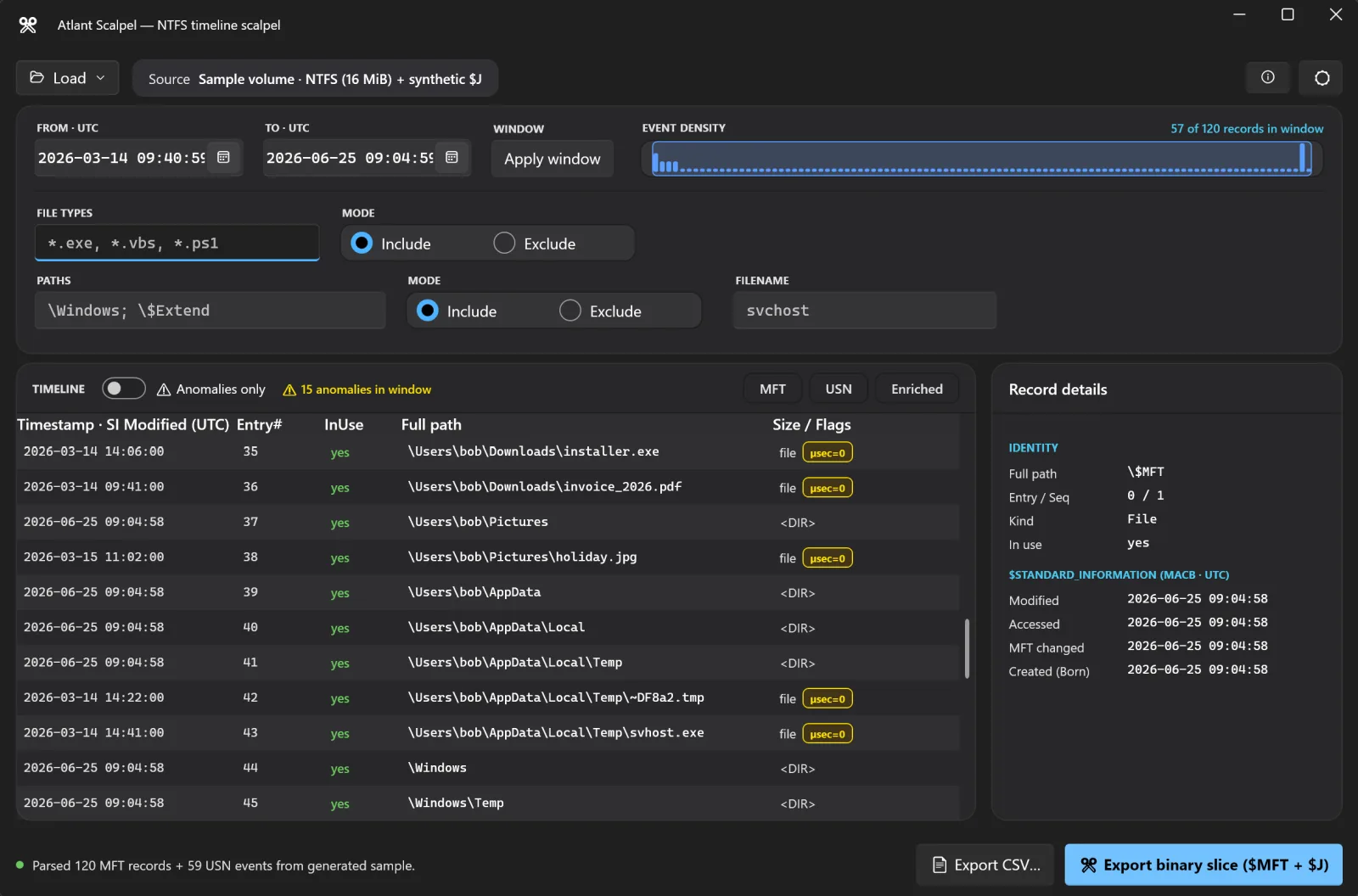
A live C: drive holds millions of MFT records and a journal full of routine churn. Dumping all of it into a spreadsheet is how investigations stall. The skill is scoping: narrow to the window that matters before you start reading. That means a precise UTC time range, often just the hours around a suspected compromise, plus filters by file extension (focus on executables and scripts, exclude noise), by path (include user profiles, exclude the Windows servicing churn), and by filename. An event-density view that shows where activity clusters lets you spot the spike that corresponds to the incident and zoom straight to it.
Exports that feed the rest of your toolkit
No timeline tool is an island. The formats that matter are the ones your other tools already speak: the MFTECmd-compatible CSV that opens directly in Eric Zimmerman's Timeline Explorer, the TSK bodyfile that pipes into The Sleuth Kit's mactime, and the l2t_csv super-timeline format that plaso and log2timeline consume. A timeline you can export cleanly into those is a timeline you can actually work with.
Building it for free with Atlant Scalpel
Atlant Scalpel is a free, single-executable tool that does exactly this workflow. Point it at a live volume, a disk image (VHDX, VHD, VMDK, or raw dd), a Volume Shadow Copy snapshot, or a standalone extracted $MFT or $UsnJrnl:$J file. It parses the MFT, with $STANDARD_INFORMATION MACB timestamps and resolved full paths, and the USN journal, then correlates them into one enriched super-timeline. An event-density histogram lets you drag across the spike to set your window, and you layer on extension, path, and filename filters to watch the timeline narrow in real time. A live C: with millions of records parses in seconds, not minutes.
When you have the slice you need, every export honors your active window and filters, so the file you ship contains exactly the records you selected, in full, never a truncated preview. You can carve a compact binary slice of just $MFT plus $J, or export MFT CSV for Timeline Explorer, a bodyfile for mactime, or l2t_csv for plaso. Scope the window, cut the slice, hand it to the next tool, and move on.
A practical sequence
- Load the source, whether a live volume, an image, or extracted artifacts.
- Use the density histogram to find where activity clusters, and drag to set the window.
- Filter to the extensions and paths that matter to your hypothesis.
- Export the enriched slice in the format your analysis tool expects.
New in v1.1.0: compound filters for precise hunt queries
The headline addition in the latest release is compound AND filters. Instead of a single set of filter boxes, you freeze the current file-type, path, and filename filters into a clause, then stack as many clauses as you need under ACTIVE FILTERS, each as a removable chip. Clauses are AND-combined, so a record is kept only when it matches every one of them. That expresses constraints a single set of boxes cannot - for example under \Windows AND not under \Windows\Temp (an include-path clause plus an exclude-path clause), or the one-click Executables preset scoped to a user profile but excluding a known-good directory. The compound drives the grid, the binary slice, and every CSV export identically: what you see is exactly what you cut.
The part no other tool does: a verified binary slice
Most timeline tools stop at text. Atlant Scalpel's signature output is a compact, renumbered, re-parse-verified binary and slice - a fraction of the source size that opens unmodified in MFTECmd, analyzeMFT, or The Sleuth Kit, exactly like the original. Every slice ships with a slice.manifest.json chain-of-custody sidecar recording the tool and version, the UTC time, the source, the window, the record counts, the verification result, and the filters applied. Because the slice is re-parsed before success is reported, a carve that does not round-trip is a failure, not a silent partial - so the artifact you hand a colleague or attach to an exhibit is trustworthy by construction. The build is a single self-contained executable that runs read-only on your sources and never unpacks anything to %TEMP%.
The MFT and the USN journal each tell half the story. Read them together, scoped to the right window, and Windows hands you a timeline you can build an investigation on. For help connecting that timeline to affected Windows hosts, accounts and recovery decisions, see our legacy and hybrid infrastructure incident response service on AI/Response.
Atlant Scalpel is free. Download Atlant Scalpel (one portable executable, no installer, no signup). To detect timestamp tampering in that timeline, its built-in anomaly flags surface timestomping automatically. Book a discovery call if you want our team to help.
Dealing with an incident, or worried about the next one?
Incident response led by people who have run these before: contain it, work out what actually happened, and close the route in. We also build the plan in advance so the first hour is not improvised.
See incident response