How to Create a Court-Defensible Disk Image on Windows for Free
Alexander Sverdlov
Security Analyst
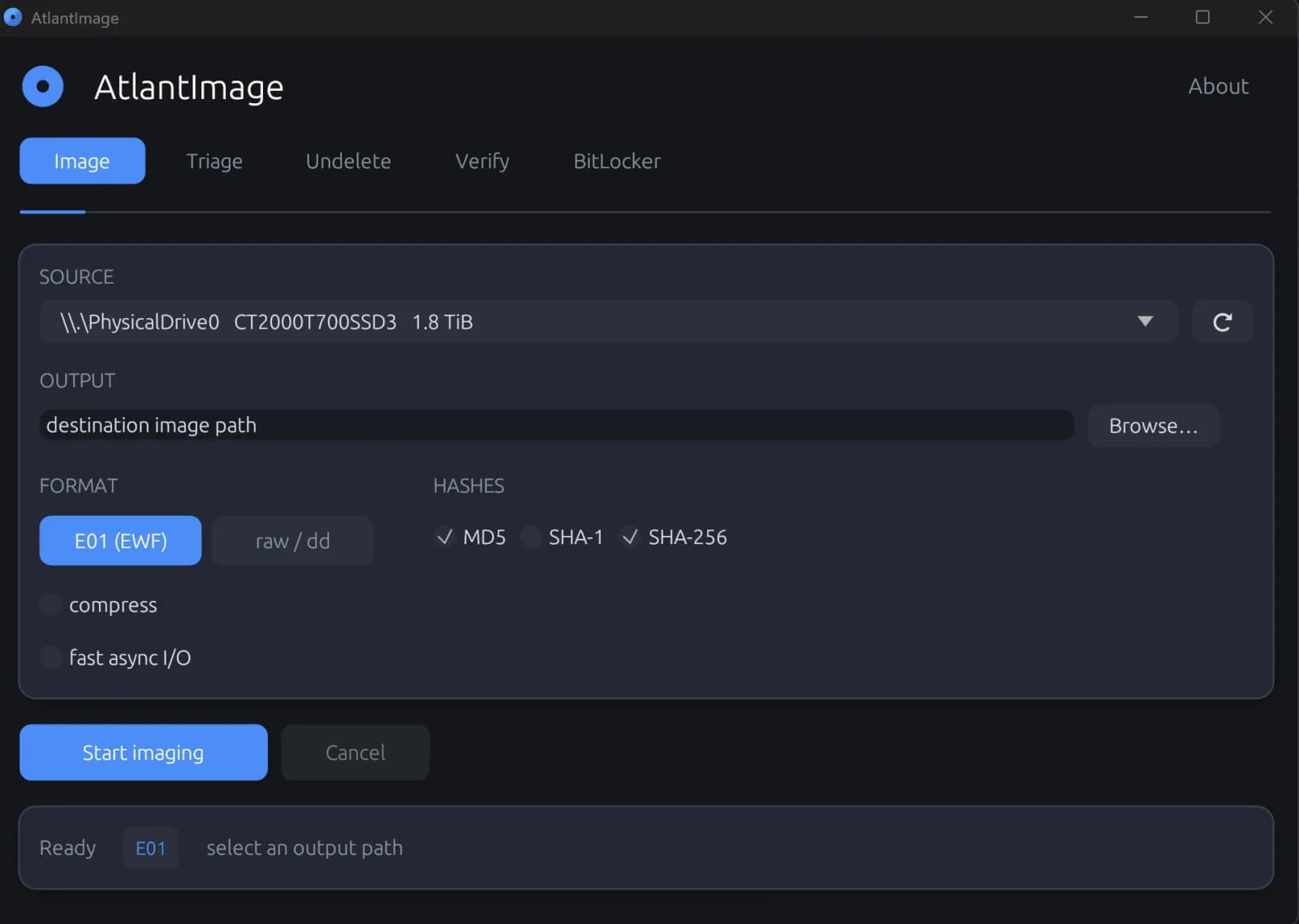
A disk image is just a file until you can prove two things about it: that it is a faithful, byte-for-byte copy of the original media, and that it has not changed since you made it. Without those two proofs, an image is worthless in a courtroom and shaky even in an internal investigation. The good news is that the discipline behind a court-defensible acquisition is not complicated, and you do not need an expensive forensic suite to follow it.
What "court-defensible" actually means
An acquisition is defensible when an independent examiner can repeat your verification and arrive at the same result. In practice that comes down to four habits:
- Preserve the original. You read from the source and never write to it. Ideally you use a hardware write blocker; at minimum you treat the source as read-only and document that you did.
- Hash everything. You compute cryptographic hashes of the source as you read it, so the image carries its own proof of fidelity.
- Verify after writing. You re-read the image you just wrote and confirm its hash matches the source. Acquisition without verification is just copying.
- Log the process. Every step, timestamp, hash, and error is recorded in a manifest you can hand to the other side.
The three hashes, and why more than one
You will see MD5, SHA-1, and SHA-256 attached to forensic images. MD5 and SHA-1 are no longer safe against a deliberate collision attack, but they remain useful as fast integrity checks and are still expected by legacy tooling and many examiners. SHA-256 is the modern cryptographic anchor. Computing all three at once costs almost nothing on a modern CPU and means your image satisfies both the old conventions and the current standard. The key point is that the hash is computed during acquisition, on the data as it streams off the disk, not in a slow second pass afterward.
Raw dd or EnCase E01?
Two output formats dominate. A raw (dd) image is a flat, bit-identical copy with no container around it: maximally compatible, but as large as the source and carrying no embedded metadata. An EnCase E01 (EWF) image wraps the same data in a forensic container that stores case metadata, embeds the acquisition hash, compresses with DEFLATE to save space, and splits into segments so a whole-disk capture fits on FAT volumes or transfers in chunks. For most acquisitions E01 is the better default; keep raw dd for cases where a downstream tool insists on a flat image, and convert between them as needed.
Surviving failing media
Drives that need imaging are often the drives that are dying. A single unreadable sector must not abort the whole acquisition or, worse, silently corrupt the offsets of everything after it. The correct behavior, pioneered by tools like ddrescue and dc3dd, is to retry the bad sector a few times, then write a zero-filled placeholder of the exact same length and log the location. The image stays the right size, every later sector lands at the right offset, and your log honestly records which regions could not be read.
Imaging a live system
Sometimes you cannot pull the disk. A running machine has open, locked files, and copying them directly produces an inconsistent snapshot. Windows solves this with the Volume Shadow Copy Service (VSS), which creates a point-in-time, read-consistent snapshot of a live volume. Imaging that snapshot gives you a coherent capture without shutting the system down, which matters when uptime or volatile context is part of the case.
Doing it for free with AtlantImage
AtlantImage is a free, single-executable forensic acquisition tool for Windows that builds all of the above in by default. Point it at a physical drive or a single volume, choose raw dd or E01, and it images with on-the-fly MD5, SHA-1, and SHA-256 hashing, then performs read-back verification that re-hashes the written image and proves it matches the source. Bad sectors are retried, zero-filled, and logged. It can capture through a VSS snapshot for live systems, split E01 output into segments, and write dc3dd-style sidecar hash and log files alongside the image. Because it runs from a single portable file with no installer, you can carry it on a USB stick and run it on the target machine without deploying anything or leaving residue behind.
From the command line the whole acquisition is one repeatable, scriptable step:
AtlantImage acquire --source \\.\PhysicalDrive0 --out case01.e01 --format e01 --hash md5,sha256 --verifyThe engine is written in Rust and built from published specifications rather than wrapping opaque third-party libraries, and each component is cross-validated against the reference tools: libewf reads its E01 images back byte for byte, and Windows Get-FileHash confirms its hashes. That transparency is itself part of being defensible, because an examiner can independently confirm the tool does what it claims.
A minimal defensible workflow
- Connect the source read-only and record the device, serial, and time.
- Acquire to E01 with MD5 and SHA-256 hashing enabled.
- Let read-back verification run and confirm the hashes match.
- Store the image, its hashes, and the manifest together, and note any logged bad sectors.
Follow that sequence and you have an image you can stand behind, produced with a tool anyone can download and check.
AtlantImage is free. Download AtlantImage (one portable executable, no installer, no signup). For live triage and deleted-file recovery, the same tool covers NTFS triage and undelete. Book a discovery call if you want our team to help.

Alexander Sverdlov
Founder of Atlant Security. Author of 2 information security books, cybersecurity speaker at the largest cybersecurity conferences in Asia and a United Nations conference panelist. Former Microsoft security consulting team member, external cybersecurity consultant at the Emirates Nuclear Energy Corporation.