
We have probably seen your problem before. Our smallest client had eight employees. Our largest secures the nuclear power plant of the United Arab Emirates. Whatever shape yours is, tell us about it and we will tell you how we would fix it.
Atlant WP Security is a comprehensive WordPress security plugin built for real-world protection. No bloat, no phone-home telemetry, no external dependencies. Every feature runs 100% locally on your server - fully compliant with security regulations out of the box.
Below is a complete overview of every feature included in the plugin.
Web Application Firewall 31 rules across 8 attack categories. Blocks SQLi, XSS, RCE, LFI, and more - before WordPress even loads. |
Scanner Detection Detects and blocks WPScan, WPProbe, Nikto, Nuclei, sqlmap, and dozens of automated scanning tools. |
Honeypot Traps 4 invisible traps: hidden links, fake login pages, comment form honeypots, and fake plugin decoys. |
Login Security Custom login URL, brute force lockouts with tiered escalation, and username enumeration prevention. |
Two-Factor Auth TOTP (Google/Microsoft Authenticator) and Email OTP. Backup recovery codes. Per-role enforcement. |
Live Visitor Dashboard Real-time monitoring with 15-second auto-refresh. See every visitor, their country, pages, bot score, and block status. |
Malware Scanner 38 malware signatures. Scans files and the database. Catches backdoors, webshells, crypto miners, and SEO spam. |
Vulnerability Audit ~60 configuration and integrity checks. PHP settings, user hygiene, info disclosure, database privileges. Grades A-F. |
AI Crawler Manager Block or allow 20+ AI/LLM crawlers individually. GPTBot, ClaudeBot, Google-Extended, Bytespider, and more. |
Post-Breach Recovery 12 emergency actions in one command center. Rotate keys, reinstall core, force password resets, generate incident reports. |
Outbound Monitor Tracks every HTTP request your server makes. Detects SSRF attacks and rogue plugin phone-home behavior. |
24 Admin Pages Beautiful custom admin interface with inner sidebar navigation. Responsive, fast, and zero external dependencies. |
Web Application Firewall
The WAF inspects every incoming request at WordPress init priority 0 - before any theme or plugin code runs. It double-decodes all payloads to catch encoding bypass tricks.
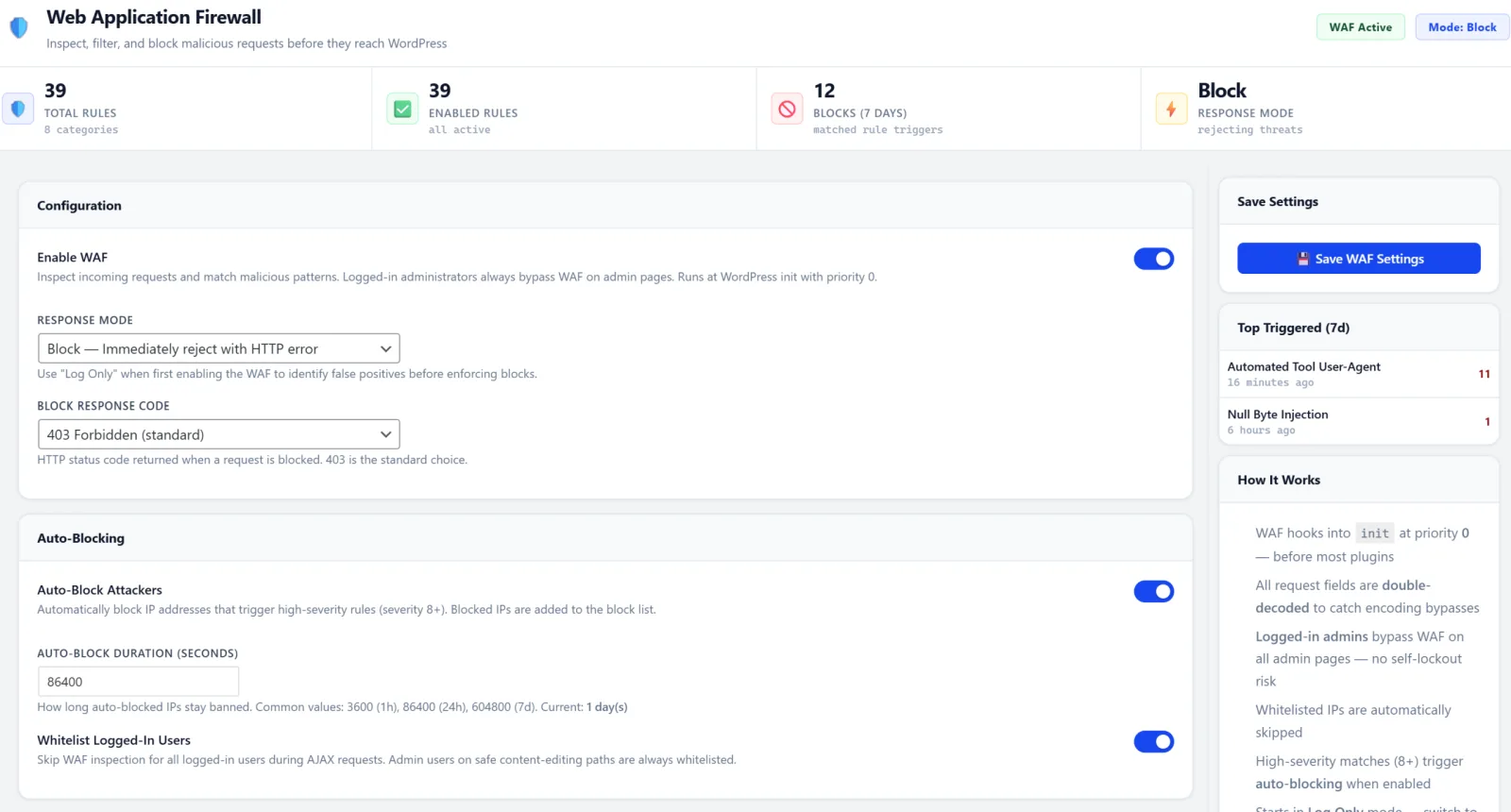
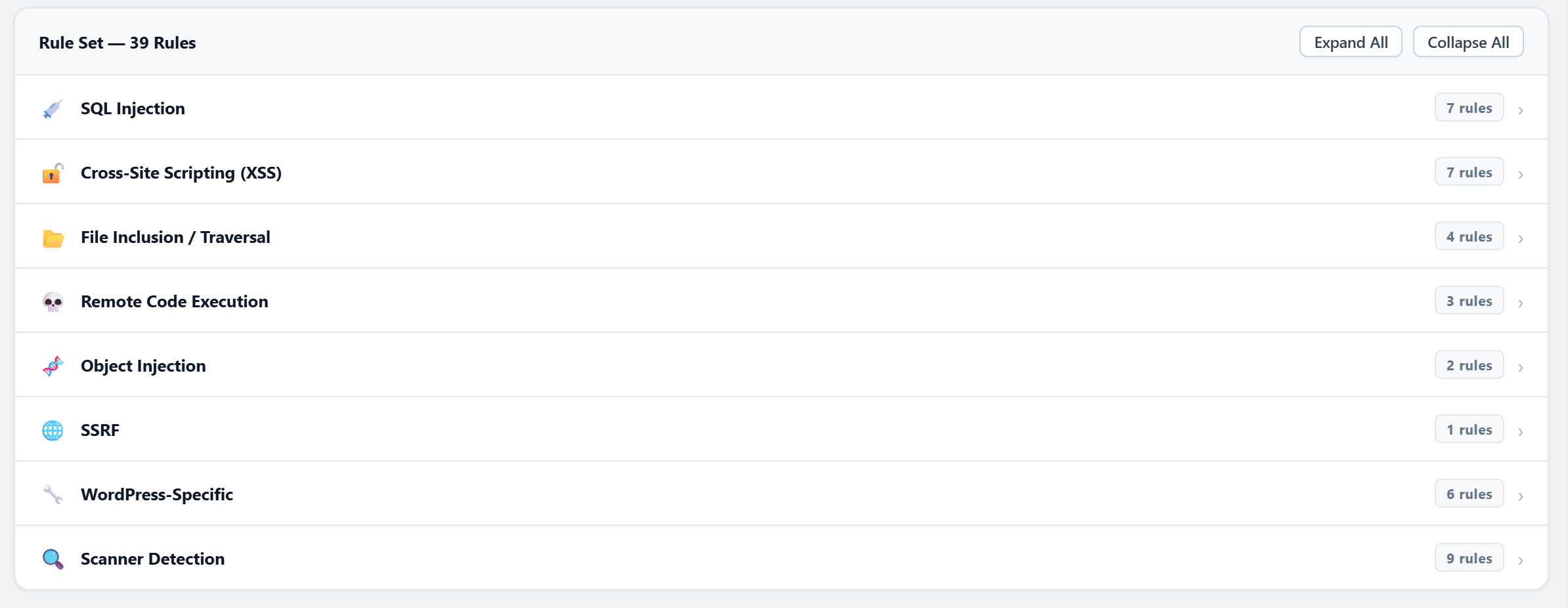
31 rules across 8 categories:
| Category | Rules | What It Catches |
|---|---|---|
| SQL Injection | 7 | UNION SELECT, time-based blind, error-based, stacked queries, auth bypass, comment injection, out-of-band |
| XSS | 7 | Script tags, event handlers, JS URIs, SVG/iframe injection, DOM manipulation, encoded payloads, template injection |
| File Inclusion | 4 | Path traversal, PHP stream wrappers, wp-config access, null byte injection |
| Remote Code Exec | 3 | Shell command injection, obfuscated code execution, dangerous PHP functions |
| Object Injection | 2 | PHP unserialize attacks, serialized payloads |
| SSRF | 1 | Internal network / cloud metadata endpoint access |
| WordPress-Specific | 6 | Debug log,.env/.git exposure, XML-RPC multicall, backup files, readme/license probing |
| Scanner Detection | 9 | Named scanners, tool user-agents, plugin/theme enumeration, directory probes, author enumeration |
4 response modes: Log Only, Block (403), Tarpit (slow response to waste attacker time), or Challenge.
Auto-blocking: High-severity matches (8+) automatically ban the attacker's IP for a configurable duration.
Behavioral detection: Identifies rapid plugin/theme enumeration bursts - even when individual requests look innocent.
Zero lockout risk: Logged-in administrators always bypass the WAF.
| Pros: Blocks attacks before WordPress loads. Double-decoding catches evasion tricks that bypass most WAFs. Tarpit mode wastes attacker time and resources. Admin bypass eliminates self-lockout risk. |
| Risks: May block legitimate requests containing special characters (e.g., code snippets in form submissions, SQL tutorial content). Tarpit mode holds connections open, consuming server memory under heavy attack. Some plugins using dynamic code patterns may trigger false positives. Start in Log mode, review matches for a few days, then switch to Block or Tarpit. |
Scanner Detection & Blocking
Purpose-built to detect and block the most popular WordPress vulnerability scanners. Multi-layered defense: signature-based, path-based, and behavioral.
Layer 1 - User-Agent Signatures
Blocks 30+ known scanner and automated tool user-agents: WPScan, sqlmap, Nikto, Nuclei, Nmap, Burp Suite, Go-http-client, python-requests, Typhoeus, and many more.
Layer 2 - Path Pattern Matching
- Plugin
readme.txtprobing (all case variants scanners use) - Plugin changelog and license file probing
- Bare plugin directory probes (403 vs 404 enumeration)
- Theme
style.css/screenshot.pngdirect access - Uploads and mu-plugins directory listing
- XML-RPC
system.listMethodsfingerprinting - Author enumeration via
?author=N
Layer 3 - Behavioral Burst Detection
Tracks unique plugin/theme slug requests per IP. If an IP hits 15+ unique slugs within 60 seconds, it triggers an instant severity-10 auto-block. Catches WPScan aggressive mode and WPProbe bruteforce - even when they randomize their user-agent.
Layer 4 - Honeypot Scanner Trap
A fake plugin directory that only automated scanners discover. Returns 403 on directory probe (scanner thinks it found a real plugin), then serves a fake readme.txt with a decoy version string. Any access triggers a permanent IP ban.
| Pros: Multi-layered approach catches scanners even when they randomize user-agents. Behavioral burst detection stops automated enumeration that individual rules miss. Honeypot trap has near-zero false positive rate. |
| Risks: May block legitimate security researchers doing authorized penetration tests. Some generic user-agents (python-requests, Go-http-client) are used by legitimate API integrations and monitoring tools. Whitelist authorized pen-testing IPs before running scans against your own site. |
Honeypot Protection
Invisible traps that catch bots without affecting real visitors. Five independent trap types, each with safe-bot protection for 35+ known search engines and social preview bots.
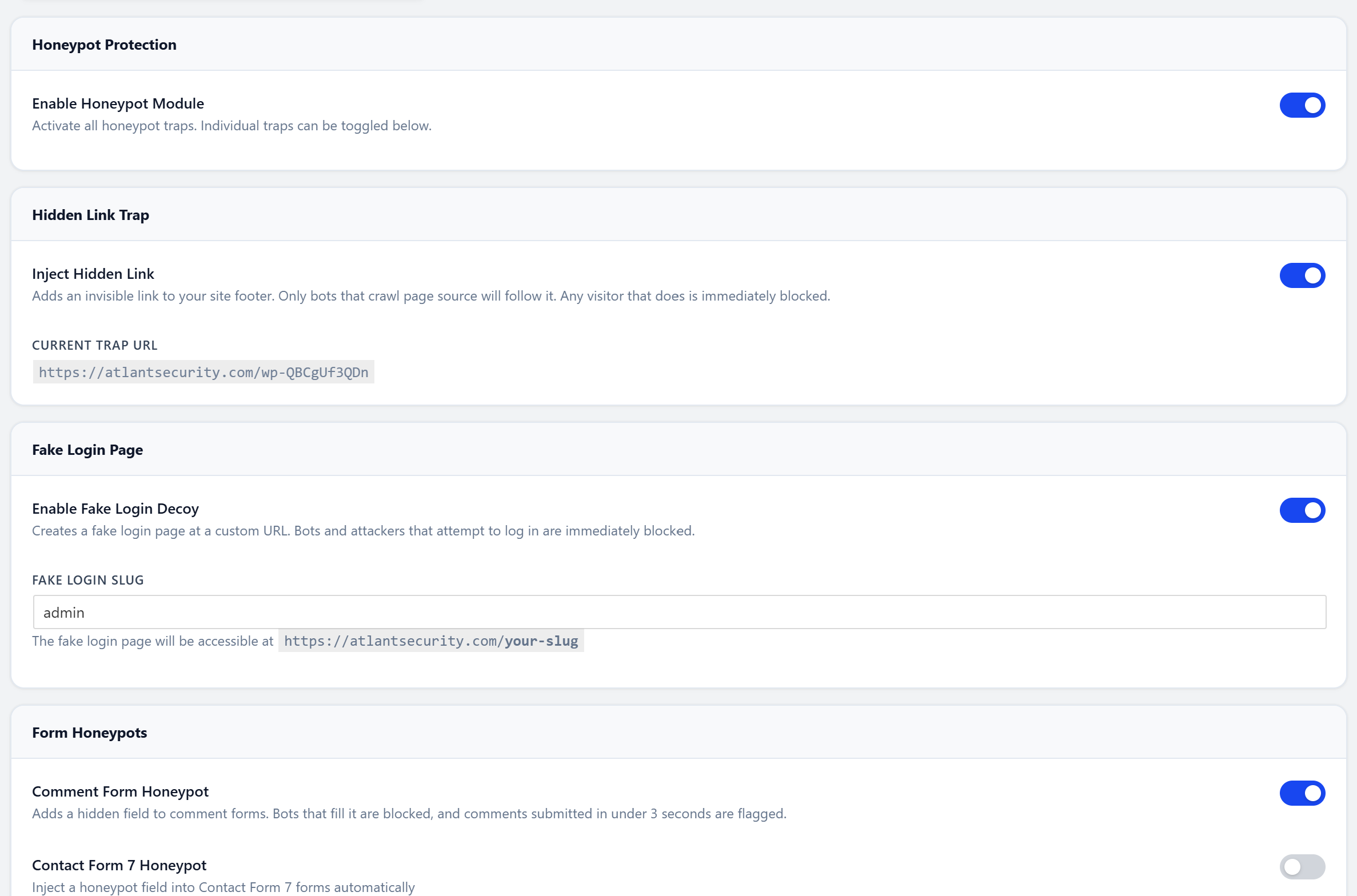
1. Hidden Link Trap - An invisible link injected in the page footer. Only bots that parse raw HTML discover it. Any visit = instant permanent ban.
2. Fake Login Decoy - A convincing fake wp-login page at a decoy URL. Bots looking for login forms get banned; the page even shows a fake error to waste their time.
3. Comment Form Honeypot - Hidden form fields that only bots fill. Works with native WordPress comments and Contact Form 7.
4. Timing Guard - Detects form submissions under 3 seconds. No human types that fast.
5. Scanner Trap - A fake plugin directory that only automated scanners probe. Described above under Scanner Detection.
| Pros: Zero false positives on real visitors - traps are completely invisible to humans. Catches bots that bypass WAF rules and rate limiting. No performance cost (traps are passive). Safe-bot list protects 35+ search engines. |
| Risks: Hidden link trap could theoretically trigger on non-standard accessibility readers or unusual crawlers not in the safe-bot list. Fake login decoy adds a URL that could confuse site auditors. The 3-second timing guard may flag power users with browser autofill. Enable hidden link and comment traps first; test fake login on staging before production. |
Login Security
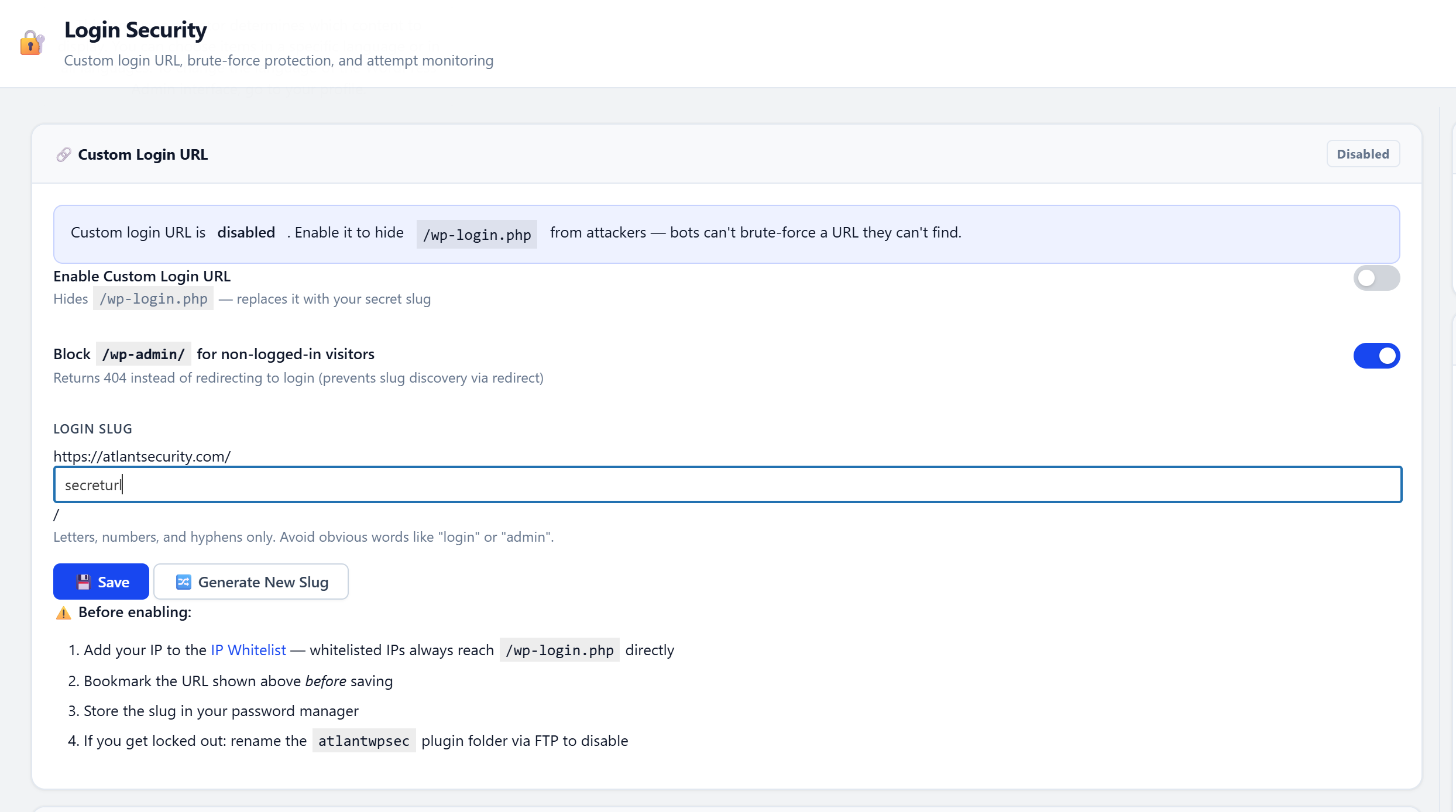
Custom Login URL
Moves wp-login.php to a secret slug of your choice. The original login path returns a real 404. Auto-generates random slugs from a word list, and disables on plugin deactivation to prevent lockouts.
Brute Force Lockout
Tracks failed login attempts per IP with tiered escalation: 5 failures = 5 min lock, 10 = 30 min, 20 = 24 hours. Uses atomic database increments to prevent race conditions under high concurrency.
Enumeration Prevention
Generic error messages on failed login (never reveals whether a username exists). Blocks ?author=N enumeration. Hides WordPress version from source code and script tags.
| Pros: Eliminates the #1 WordPress attack vector (brute force on wp-login.php). Custom login URL hides the login page from automated scanners entirely. Tiered lockout escalation adapts to attack intensity. Auto-deactivates on plugin disable to prevent lockout. |
| Risks: Custom login URL - if you forget the slug, you're locked out (mitigated by safe mode and deactivation reset). Aggressive lockout thresholds can lock out legitimate users who mistype passwords repeatedly. Generic error messages make password recovery slightly less intuitive for non-technical users. Save your custom login URL in a password manager. Start with default lockout thresholds. |
Two-Factor Authentication
Adds a second authentication step after password login.
- TOTP - Works with Google Authenticator, Microsoft Authenticator, and any standard TOTP app. QR code setup.
- Email OTP - One-time code sent to the user's registered email. 5-minute expiration, rate-limited resend.
- Backup Codes - 10 recovery codes for emergency access if the phone is lost.
- Per-Role Enforcement - Require 2FA for administrators, editors, or any custom role.
| Pros: Even if a password is stolen, the attacker cannot log in without the second factor. TOTP is free and offline - no SMS costs or carrier vulnerabilities. Backup codes provide emergency access. Per-role enforcement avoids burdening low-privilege users. |
| Risks: Users who lose their phone and haven't saved backup codes will be locked out - only an admin can reset their 2FA. Email OTP depends on reliable mail delivery; if your server's SMTP is down, login fails. Enforcing 2FA site-wide may frustrate contributors or guest authors. Generate and store backup codes immediately after setup. Enforce for admins and editors first, expand later. |
Session Security
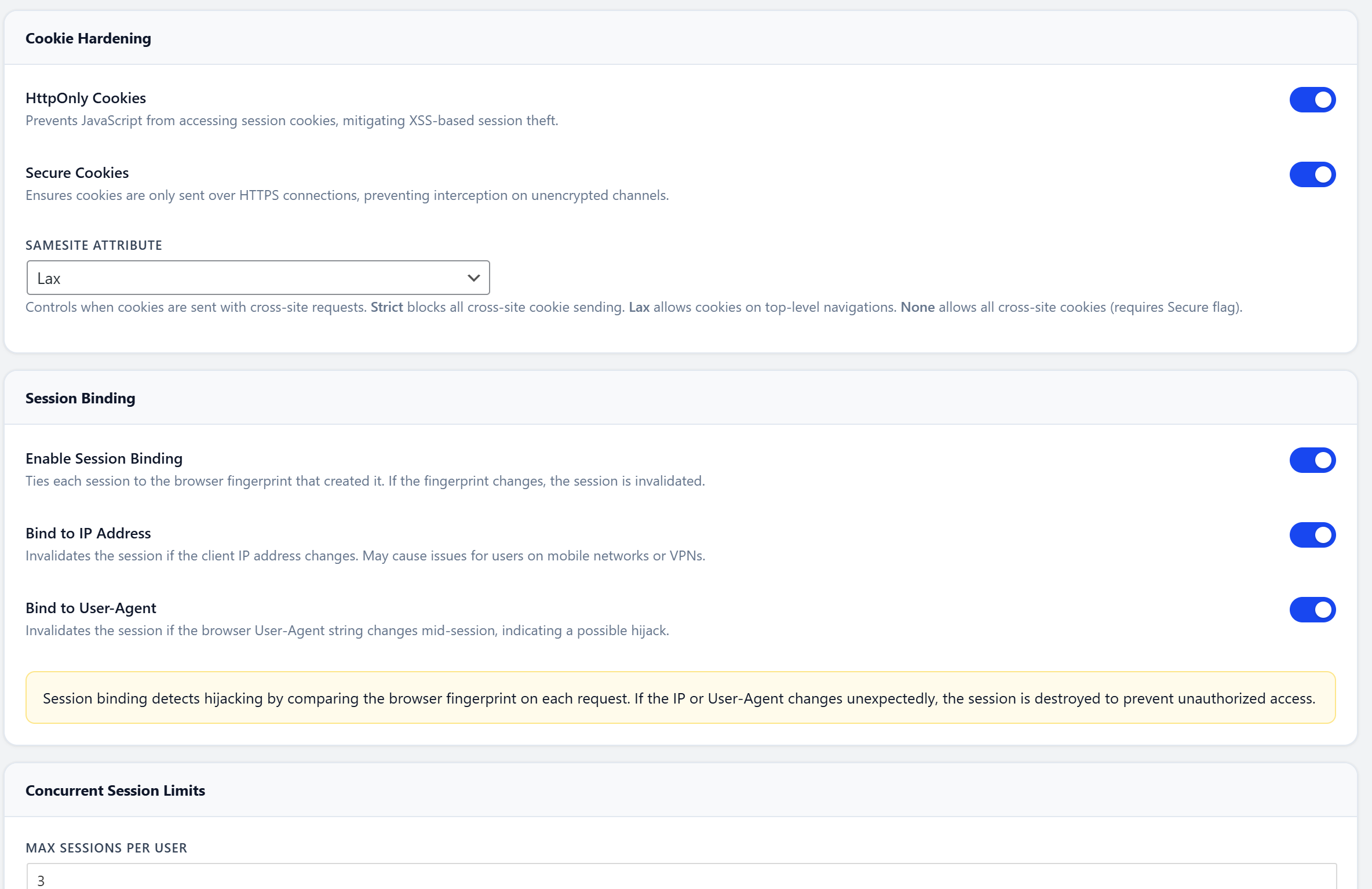
- Cookie Hardening - Enforces HttpOnly, Secure, and SameSite=Strict flags on all auth cookies.
- Session Fingerprinting - Binds each session to the user's IP + User-Agent. Stolen cookies become useless.
- Concurrent Session Limit - Configurable max active sessions per user. Oldest session destroyed on login.
- Idle Timeout - Auto-logout after configurable inactivity period. Optional admin exemption.
- Session Management Panel - View and terminate active sessions from the admin dashboard.
| Pros: Prevents session hijacking - stolen cookies become useless on a different IP/browser. Concurrent limits stop credential-sharing. Idle timeout protects unattended workstations. Full session visibility from the admin panel. |
| Risks: Session fingerprinting (IP+UA binding) invalidates sessions for users on mobile networks where IPs rotate, or VPN users who switch servers. Strict idle timeout may log out authors mid-post while researching. Low concurrent session limits may lock out users switching between phone and desktop. Exempt admins from idle timeout. Set concurrent sessions to 3+. Disable fingerprinting if your audience is primarily mobile. |
Password Policy & Passphrase Generator
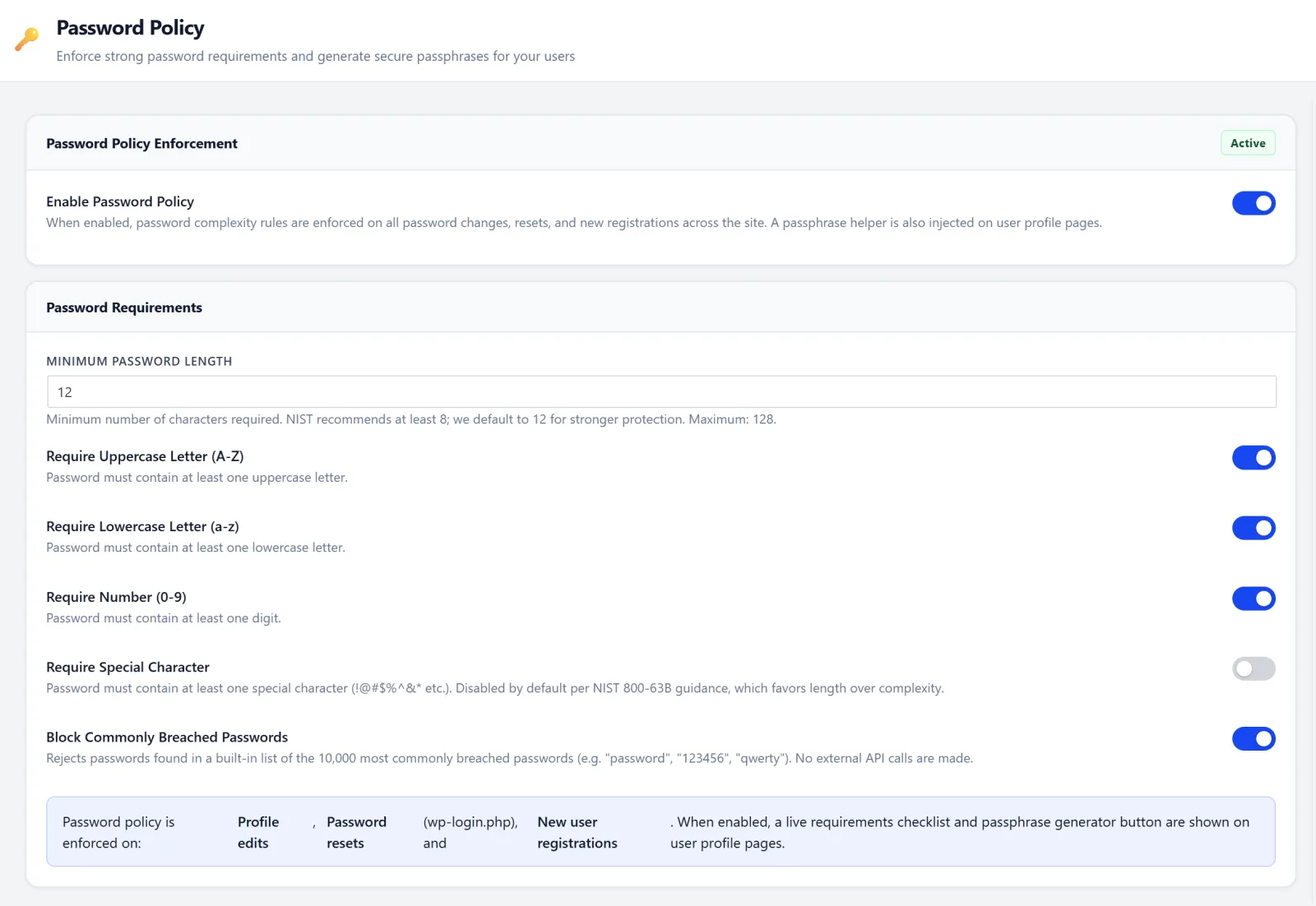
- Minimum Length - Configurable, default 12 characters.
- Complexity Requirements - Uppercase, lowercase, numbers, symbols.
- Breach Database Check - Rejects passwords found in the HaveIBeenPwned database.
- Passphrase Mode - correct-horse-battery-staple style. Easier to remember, harder to crack. Built-in generator.
- Enforced Everywhere - Profile edits, password resets, and new registrations.
| Pros: Prevents weak passwords across the board. Breach database check (via HaveIBeenPwned k-anonymity API) stops credential reuse without exposing the full password. Passphrase mode is more user-friendly and produces stronger passwords than complex character requirements. |
| Risks: Strict requirements may frustrate users on sites with open registration. The breach database check sends a partial SHA-1 hash prefix to the HIBP API (privacy-safe k-anonymity, but still a network call). Passphrase mode may confuse users who expect traditional password fields. Use passphrase mode for the best security-to-usability ratio. The HIBP check never sends the full password - only 5 hex characters of the hash. |
Malware Scanner
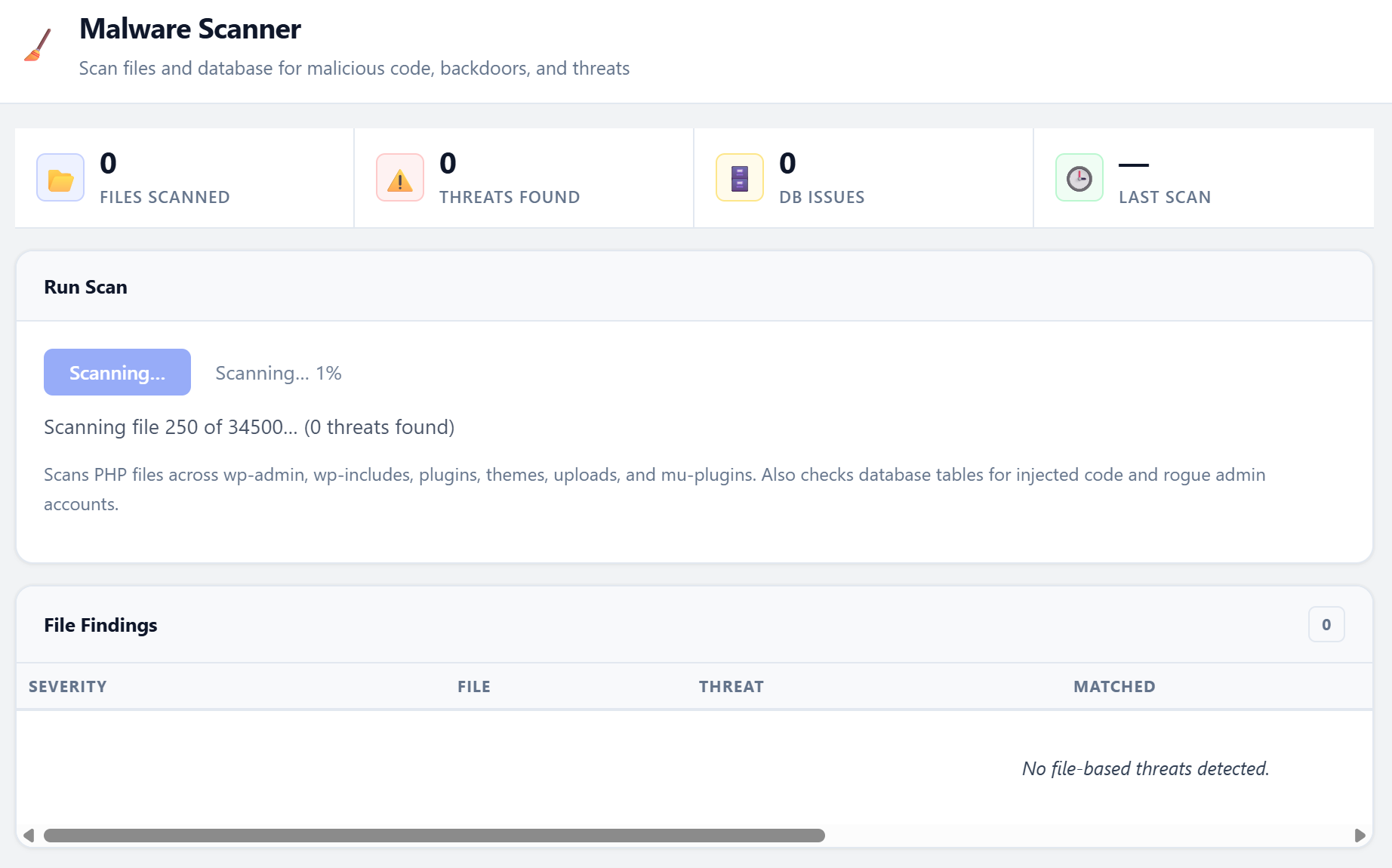
Scans both files and the database for malicious content.
38 malware signatures covering:
- PHP backdoors (obfuscated code execution, encoding tricks, deprecated functions)
- Known webshells (b374k, WSO, c99, r57, China Chopper)
- Crypto miners (xmrig, Monero, Coinhive)
- Malicious redirects, hidden iframes, credit card skimmers
- Long obfuscated encoded strings (500+ chars)
- Critical file modifications (wp-login.php, wp-config.php, wp-settings.php)
Database scanning:
Full analysis of wp_options and wp_posts tables for obfuscated code, serialized backdoors, and SEO spam injections.
Batched scanning with real-time progress bar, pause/resume support, and a quarantine system for suspicious files.
| Pros: Catches backdoors and infections that other security measures missed. Database scanning finds malware in posts and options that file-only scanners miss. Quarantine isolates threats without permanently deleting anything. All scanning is local - no files are uploaded to external services. |
| Risks: False positives - some legitimate plugins use obfuscated or encoded code for license validation (e.g., ionCube, SourceGuardian). Scanning large sites is CPU-intensive and may cause brief slowdowns. Database scanning on large wp_posts tables (100K+ rows) can be slow. Schedule scans during off-peak hours. Review findings manually before quarantining - especially for commercial plugins with license obfuscation. |
Vulnerability Audit
One-click audit that runs ~60 checks against your WordPress configuration, server settings, and file permissions. Returns a security grade from A to F.
Check categories:
- WordPress Core - Version, debug mode, file editor, SSL admin, core file integrity (MD5 checksums vs WordPress.org)
- PHP & Server - PHP version, dangerous functions, file uploads, expose_php
- File System - Permissions on wp-config.php,.htaccess, PHP files in uploads
- User & Auth - Default "admin" username, user enumeration, empty passwords
- Hardening - File editor disabled, auto-updates, robots.txt, XML-RPC
- Security Headers - X-Frame-Options, X-Content-Type, HSTS, CSP, Permissions-Policy
- Info Disclosure - Directory listing, debug.log,.git/.env exposure, readme.html
- Database - Table prefix, privileges, connection security
- Plugins & Themes - Outdated plugins, inactive plugins (attack surface), theme updates
Every failed check includes a Fix recommendation and, where possible, a one-click Enable button to apply the fix directly.
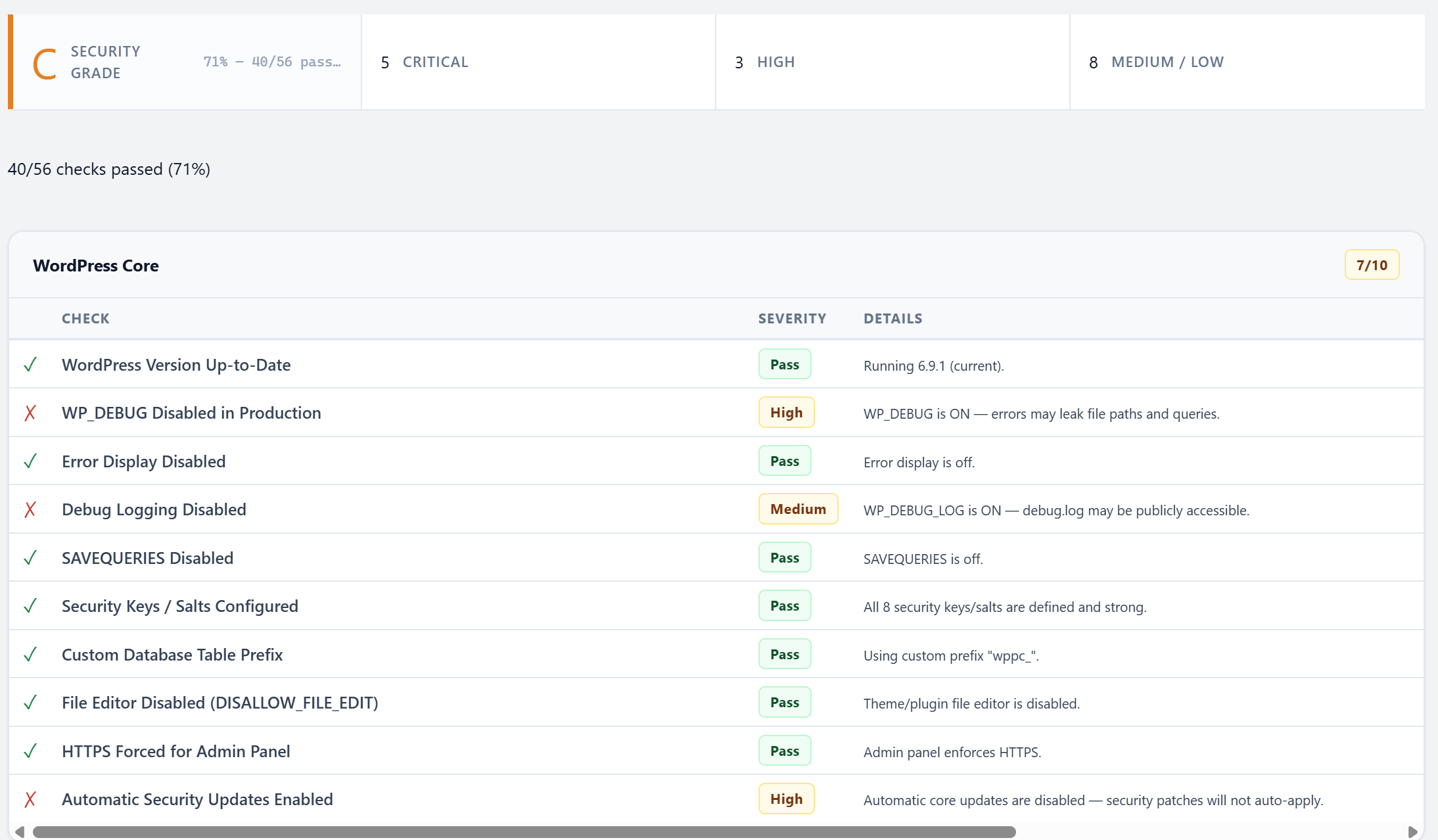
| Pros: Identifies configuration weaknesses before attackers find them. One-click fixes make remediation trivial. Letter grade gives a quick snapshot of overall posture. Core file integrity check (MD5 vs WordPress.org) detects tampering. |
| Risks: Some recommendations may conflict with specific hosting configurations (e.g., managed hosts that handle file permissions differently). Disabling the file editor (a common recommendation) prevents emergency code fixes from wp-admin. Changing file permissions may not persist on managed hosting with automated permission resets. Review each recommendation before applying. Run the audit after initial setup and after any major site changes. |
AI & LLM Crawler Manager
Manage how AI companies crawl your content. Per-crawler allow/block controls with automatic robots.txt integration and HTTP 403 enforcement for crawlers that ignore it.
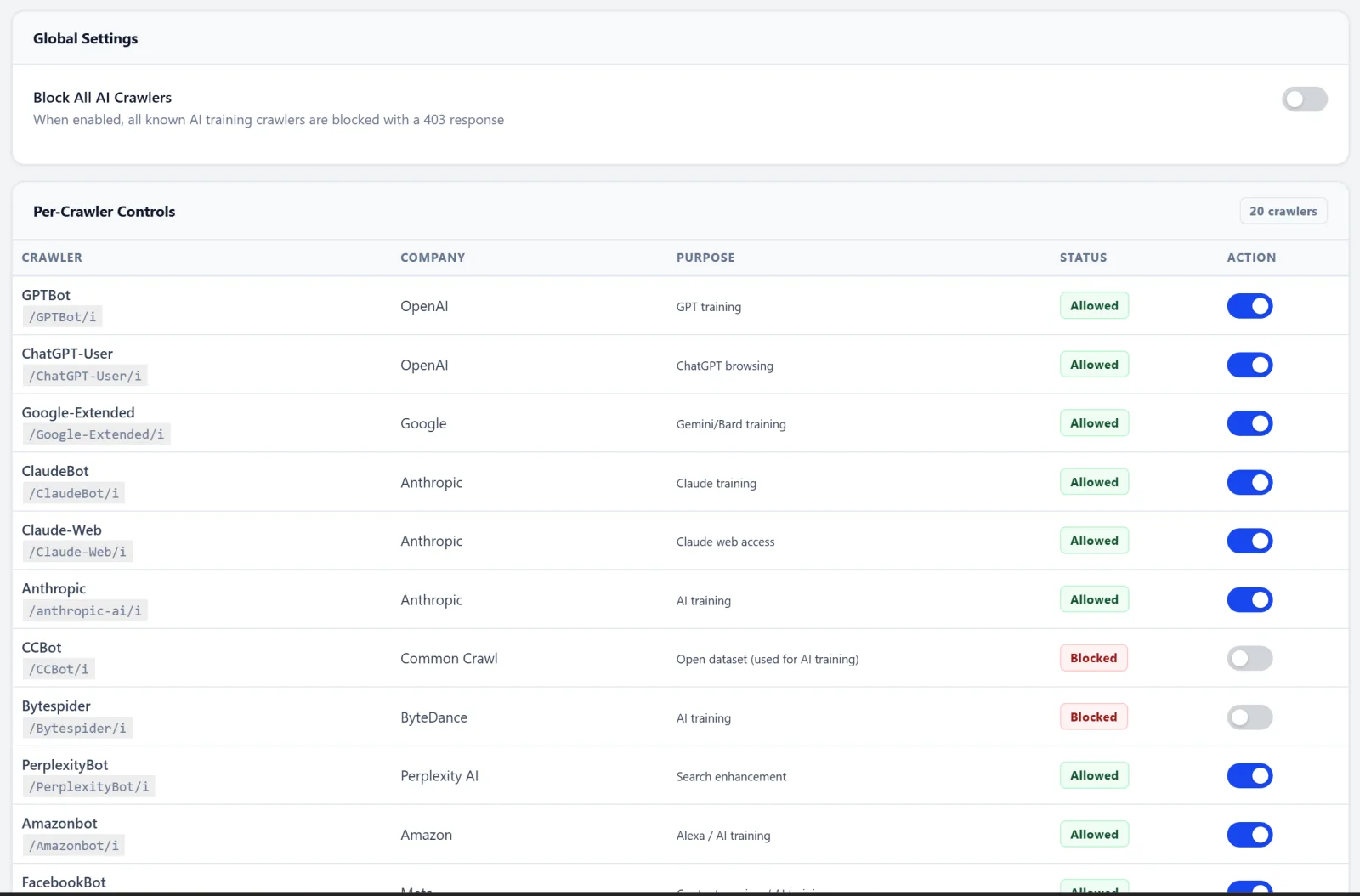
20+ crawlers tracked:
GPTBot, ChatGPT-User, Google-Extended, ClaudeBot, Claude-Web, Bytespider, CCBot, PerplexityBot, AmazonBot, Applebot-Extended, Meta-ExternalAgent, and more. Each with its own toggle, stats, and detailed description.
| Pros: Protects your content from being used in AI model training without your consent. Per-crawler granularity lets you allow some AI services while blocking others. Dual enforcement via robots.txt and HTTP 403 catches crawlers that ignore robots.txt. |
| Risks: Blocking Google-Extended may reduce visibility in Google AI Overviews and other AI-powered search features. Blocking all AI crawlers means your content won't surface in ChatGPT, Perplexity, or Claude answers - which some sites use as a traffic source. Some AI crawlers share user-agent strings with legitimate services. Block training crawlers (GPTBot, CCBot, Bytespider) but consider keeping search-linked ones (Google-Extended) if AI-referral traffic matters to you. |
Live Visitor Dashboard
Your security command center. Displays real-time data with 15-second auto-refresh.
- Stat Cards - Online visitors (last 5 min), 24h requests, bot traffic %, blocked requests
- Traffic Chart - 24-hour graph with toggles for All Traffic / Bots Only / Blocked Only
- Live Feed - Every visitor with IP, country (GeoIP), page, browser, user-agent, bot classification
- Top IPs - One-click VirusTotal reputation lookup for any suspicious IP
- Top Pages - Most-visited URLs in the last 24 hours
- Browser Distribution - Pie chart of visitor browsers and bot types
- Request Detail Modal - Click any IP to see full request history, block, or whitelist
| Pros: Real-time visibility into exactly who is visiting your site and what they're doing. One-click IP blocking and VirusTotal lookups directly from the feed. Bot vs. human classification helps identify automated abuse. |
| Risks: The 15-second auto-refresh generates admin AJAX traffic, adding minor server load while the dashboard is open. On high-traffic sites (10K+ daily requests), the visitor log database table grows quickly - set retention to 7-14 days. Data stored in the database increases backup sizes. The dashboard only auto-refreshes while you're actively viewing it - it has no impact when closed. |
Rate Limiting
Sliding window rate limiter with 11 endpoint categories. Uses APCu when available for maximum performance.
| Endpoint | Default Limit |
|---|---|
| Frontend | 60 req/min |
| Login | 10 req/5min |
| Search | 15 req/min |
| RSS Feed | 10 req/min |
| REST API | 60 req/min |
| REST API (unauth) | 30 req/min |
| AJAX | 60 req/min |
| WooCommerce Checkout | 5 req/min |
| XML-RPC | 3 req/min |
| Cron | 1 req/min |
| Pros: Prevents DDoS and resource abuse without blocking legitimate traffic. Per-endpoint granularity means login can be strict while the frontend stays relaxed. Uses APCu (in-memory) when available for near-zero performance cost. Sliding window is fairer than fixed-window algorithms. |
| Risks: Too-aggressive frontend limits can block real users during viral traffic spikes. Low WooCommerce checkout limits may prevent rapid repeat purchases (increase for high-volume stores). RSS feed limiting may affect podcast apps and feed readers that poll frequently. Shared IP environments (offices, universities) may hit limits faster. Monitor rate-limit hits for a week before tightening. Increase limits for WooCommerce and REST API on busy sites. |
Security Headers
Configure all modern HTTP security headers from a single panel.
- HSTS - Strict-Transport-Security with max-age, includeSubDomains, and preload options
- X-Frame-Options - Clickjacking protection. DENY, SAMEORIGIN, or ALLOW-FROM
- X-Content-Type-Options - Prevents MIME sniffing. Always
nosniff - Referrer-Policy - Control how much URL info is shared with external sites
- Permissions-Policy - Disable geolocation, microphone, camera, payment, and more
- Content Security Policy - Report-only mode for safe testing, enforce mode for production. WordPress-aware defaults
- Cross-Origin Headers - CORP and COOP for origin isolation
- Remove Leaky Headers - Strips X-Powered-By and Server header
| Pros: Defense-in-depth against clickjacking, XSS, protocol downgrade, and MIME-sniffing attacks. HSTS ensures browsers always use HTTPS. CSP restricts where scripts and resources can load from. All configured from one panel. |
| Risks: HSTS - once enabled, browsers refuse HTTP for the max-age period. If your SSL cert expires or you need to revert to HTTP, visitors can't access your site until max-age expires. HSTS preloading is practically irreversible. CSP - a misconfigured policy will break inline scripts, Google Analytics, ad networks, payment forms, and third-party widgets. Start CSP in report-only mode. Set HSTS max-age to 300 (5 min) initially, then increase gradually. Never enable preload until you're 100% committed to HTTPS forever. |
IP Management
Block List
Manual or automatic IP blocking with permanent or temporary bans. Every block tracks the reason, triggering rule, and request count. Prevents admins from blocking their own IP.
Whitelist
Whitelisted IPs bypass everything: WAF, rate limiting, honeypots, custom login URL, REST API policies. One-click "Whitelist My IP" button. Your IP is auto-whitelisted on plugin activation.
Visitor Log
Every HTTP request logged with IP, country, method, URL, user-agent, bot score, and block status. Configurable retention (default 30 days). One-click VirusTotal lookup for any IP.
| Pros: Precise control over individual IPs. Automatic blocking triggered by other modules (WAF, honeypot) means zero manual effort. Whitelist guarantees you never lock yourself out. Full request history aids forensic investigation. |
| Risks: IP blocking is unreliable against attackers using VPNs, Tor, or rotating botnets. Whitelisted IPs bypass all security - if a whitelisted IP is compromised, the attacker has full access. Dynamic residential IPs change regularly, so bans may hit innocent users later and whitelisted IPs may become someone else's. Keep your whitelist minimal. Don't rely on IP blocking as your only defense - layer it with WAF, 2FA, and rate limiting. |
Outbound HTTP Monitor
Intercepts every outbound HTTP request your server makes. Identifies which plugin or theme initiated the call. Most security plugins only watch incoming traffic - this watches what leaves.
- SSRF Prevention - Blocks requests to private IP ranges and cloud metadata endpoints (169.254.169.254)
- Domain Allowlist - Wildcard support. Default: WordPress.org, Google APIs, GitHub, Cloudflare
- Caller Detection - Traces each request back to the plugin/theme that made it
- Anomaly Scoring - Flags unusual outbound destinations
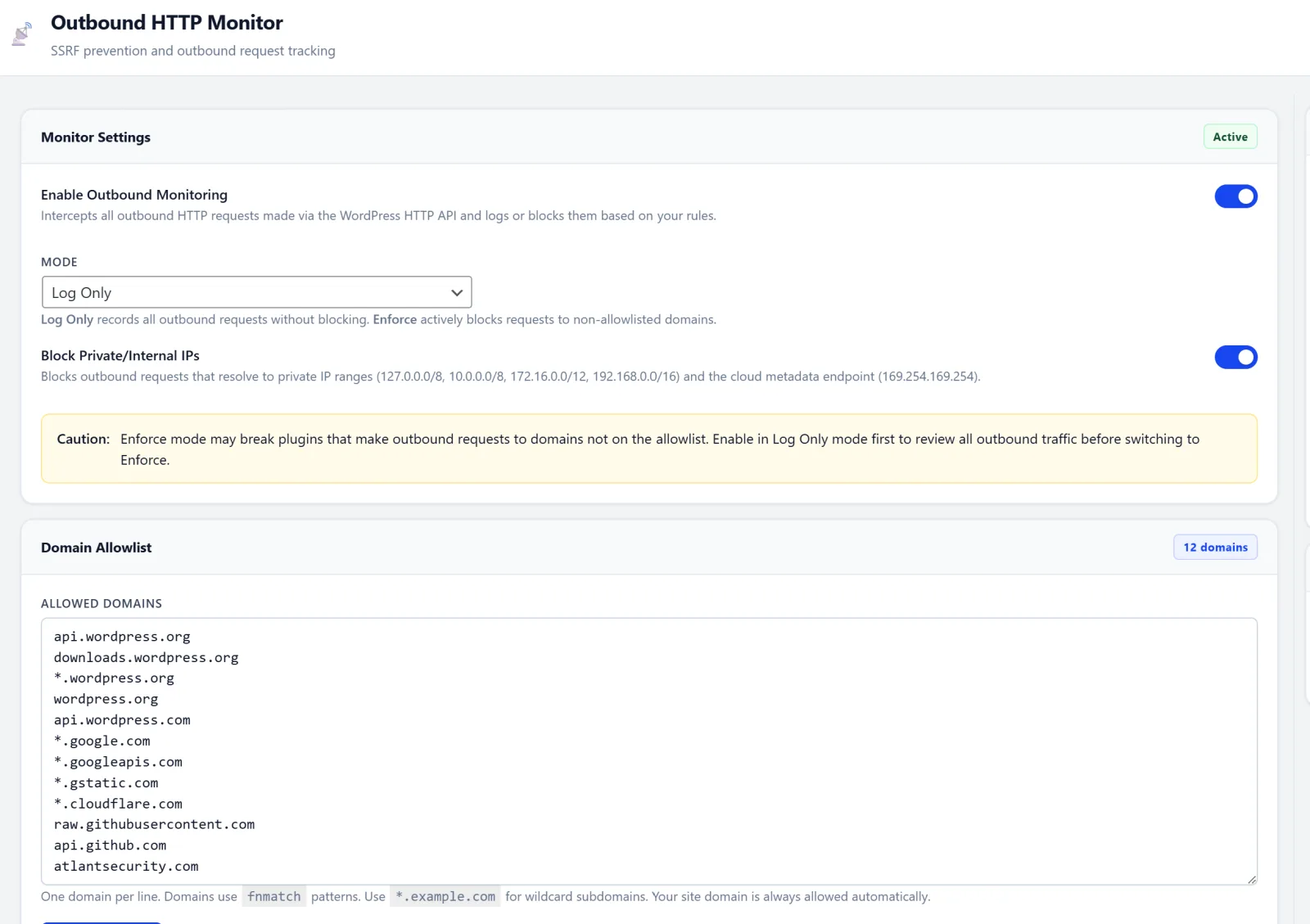
| Pros: Catches compromised plugins that silently phone home or exfiltrate data. SSRF prevention blocks access to internal network and cloud metadata endpoints. Caller detection traces each request to the responsible plugin/theme. Most security plugins only watch incoming traffic - this watches what leaves. |
| Risks: An overly strict domain allowlist will break plugins that legitimately call external APIs (payment gateways, email services like Mailchimp/SendGrid, social media embeds, map services). May generate noise on sites with many third-party integrations. Start in monitor-only mode. Review outbound requests for a week, then add legitimate domains to the allowlist before enabling blocking. |
⧡ REST API Micro-Policies
Granular per-route access control. Not the all-or-nothing approach of other plugins that break site functionality.
- Auth requirements per route - Public, authenticated only, or admin only
- HTTP method restrictions - GET only, POST only, or custom
- Per-route rate limiting - Independent sliding window per endpoint
- IP whitelisting - Restrict sensitive endpoints to specific IPs
- Visual policy builder - Configure everything from the admin UI
| Pros: Granular per-route control - not the all-or-nothing approach that breaks sites. Restricting the /users endpoint alone prevents most REST API enumeration attacks. Per-route rate limiting adds an extra defense layer on sensitive endpoints. |
| Risks: Overly restrictive policies break the Gutenberg editor, WooCommerce, and headless WordPress setups. Requiring authentication on all routes breaks public-facing contact forms and AJAX features. Some themes and page builders rely on unauthenticated REST access to render content. Only restrict routes you've verified aren't used publicly. The /users endpoint is the safest to lock down. Test thoroughly after every change. |
Hardening
One-click toggles for WordPress security best practices.
- Force SSL for admin
- Disable file editor (plugin/theme editor)
- Block REST API
/usersendpoint - Disable XML-RPC
- Auto-update plugins and themes
- Remove leaky headers
- Block author enumeration
- Hide WordPress version
| Pros: Quick wins that reduce attack surface with minimal effort. Each toggle is independent - enable only what you need. Version hiding and header removal reduce information leakage to scanners. |
| Risks: Disabling the file editor prevents emergency code fixes from wp-admin (use SFTP/SSH instead). Disabling XML-RPC breaks Jetpack, the WordPress mobile app, and pingback/trackback features. Forcing SSL fails if your SSL certificate is misconfigured or expired. Auto-updates may introduce breaking changes from plugins that push buggy releases. Disable file editor (use SFTP). Disable XML-RPC only if you don't use Jetpack or the WP mobile app. Verify SSL before forcing it. |
Cron Guard
Monitors WordPress scheduled tasks (wp-cron) for unauthorized or suspicious entries. Malware commonly plants cron jobs to persist after cleanup.
- Detects newly added cron tasks vs. baseline
- Flags suspiciously low intervals (<5 min)
- Distinguishes WordPress core crons from plugin/custom crons
- One-click approval or removal of suspicious tasks
- Execution frequency and last-run monitoring
| Pros: Catches malware persistence mechanisms - attackers commonly plant cron jobs that re-infect after cleanup. Baseline comparison makes it easy to spot newly added tasks. Distinguishes WordPress core tasks from third-party ones. |
| Risks: Removing legitimate plugin cron jobs can break scheduled features (automated backups, email queues, cache clearing, analytics reporting). Not all non-core cron jobs are suspicious - many popular plugins register custom schedules. Review unknown cron tasks with the plugin developer before deleting. Approve known-good tasks to prevent future false alerts. |
Post-Breach Recovery
12 emergency actions available from a single command center. Every action is logged to the audit trail.
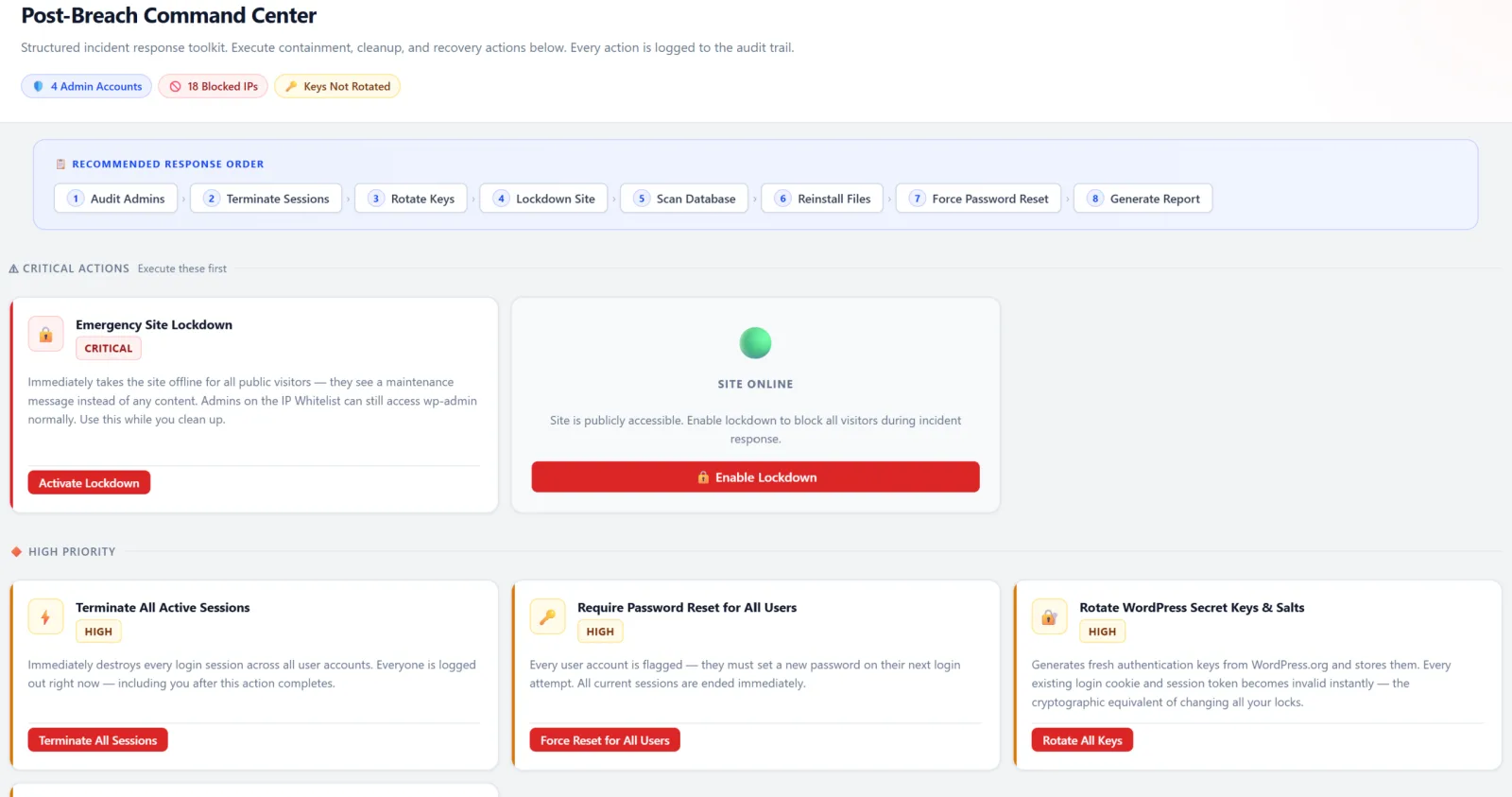
| Terminate All Sessions | Force Password Reset |
| Rotate Secret Keys | Reinstall WordPress Core |
| Reinstall All Plugins | Audit Admin Accounts |
| Revoke App Passwords | Clear All Transients |
| Lockdown Site | Unlock Site |
| Run Malware Scan | Generate Incident Report |
| Pros: Organized emergency response instead of panic. All critical recovery actions in one centralized command center. Every action is audit-logged for accountability. Incident report generation aids compliance and insurer communication. |
| Risks: These are destructive operations - use only when a breach is confirmed. Force password reset logs out every user immediately. Core reinstall may conflict with intentionally modified core files. Lockdown mode makes the site inaccessible to everyone except whitelisted IPs. Rotating secret keys invalidates all existing sessions and cookies. Read each action's description before clicking. Keep a recent backup before running any breach recovery action. |
Notifications
Get alerted when something happens. Deduplication prevents notification spam.
- Email - HTML-formatted alerts with severity colors
- Slack - Native Slack webhook integration with formatted blocks
- Webhook - JSON payloads to any custom endpoint
Alerts for: WAF blocks, login failures, honeypot triggers, IP bans, 2FA events, session anomalies, malware findings, cron abuse, and breach detection. Daily digest option.
| Pros: Real-time awareness of security events without constantly checking the dashboard. Multi-channel delivery (Email + Slack + Webhook) ensures you don't miss critical alerts. Deduplication prevents notification spam during sustained attacks. |
| Risks: Too many notifications leads to alert fatigue - important events get lost in noise. Without deduplication, a brute force attack could generate hundreds of emails. Slack webhook URLs are sensitive; if leaked, anyone can post to your channel. Use daily digest for routine events (WAF blocks, rate limits). Reserve immediate alerts for critical events only (breaches, new admin accounts, malware findings). Store webhook URLs securely. |
GeoIP Database
MaxMind GeoLite2-Country integration with a pure-PHP MMDB reader. No Composer or PHP extensions required. Auto-updates weekly via cron. Provides country data in the visitor log, dashboard, and blocking rules.
| Pros: Country-level context for all traffic. Enables geo-based blocking (e.g., block countries you don't serve). Pure PHP - no Composer or C extensions needed. Weekly auto-updates keep data current. |
| Risks: GeoIP accuracy is ~95-99% for countries - some IPs are misattributed, especially mobile carriers and VPN exits. The database file (~5 MB) needs disk space and weekly downloads. Requires a free MaxMind license key. Use for logging and context rather than as a sole blocking criterion. Combine geo data with other signals for blocking decisions. |
Audit Log
Tamper-evident log of every administrative action. Tracks who changed what, when, and from which IP. Stored in a dedicated database table, separate from WordPress logs. Configurable retention.
| Pros: Full forensic trail for incident investigation. Compliance requirement for GDPR, PCI-DSS, and SOC 2. Separate table means WordPress log cleanup doesn't erase security history. Tamper-evident design prevents attackers from covering their tracks. |
| Risks: On busy multi-author sites, the audit log table grows quickly. Long retention periods increase database and backup size. Changed option values may be stored in plain text (review what's logged if handling sensitive settings). Set retention to 90 days for most sites. Ensure database backups are encrypted if sensitive option changes are logged. |
Setup & Safety Architecture
Setup Wizard
First-run experience with two paths: Recommended Settings (one click, sensible defaults) or Custom Configuration (step-by-step). Gets you protected in under a minute.
Safe Mode Kill Switch
Add define('ASWP_SAFE_MODE', true); to wp-config.php to instantly disable all blocking features. Emergency override for lockouts.
Anti-Lockout Safety Nets
- Admin IP auto-whitelisted on activation
- Grace cookie prevents lockout when sessions expire
- Custom login URL deactivates on plugin deactivation
- Admins always bypass the WAF
Zero External Dependencies
No CDN, no external fonts, no third-party JavaScript, no telemetry. Every asset is served locally. The plugin never phones home.
By the Numbers
| 20+ Security Modules |
24 Admin Pages |
31 WAF Rules |
| 38 Malware Signatures |
~60 Audit Checks |
12 Breach Actions |
| 6 Database Tables |
5 Automated Cron Jobs |
0 External Dependencies |
Download Atlant Security for WordPress
Free. Open source. 17 security modules. Zero telemetry.
Get It on WordPress.org →Ready to get started? Atlant Security helps companies close security gaps and pass compliance fast, led personally by a former Microsoft security consultant with 200+ assessments across 14 countries. Book a free strategy call and get a fixed-price proposal within 24 hours.
Want to know where you actually stand?
A fixed-price IT security audit answers that in 14 days: 20 NIST 800-53 domains checked against your live environment, findings ranked by what an attacker can reach, and a remediation plan with named owners. You read the report before you pay.
See what the 14-day audit covers